
Vietnam Prices and Delivery Dates
Apple's first touchscreen MacBook Pro is now available to order in Vietnam, with prices starting at 79,999,000 Vietnamese dong. A fully configured version with the larger screen reaches 397,624,000 dong, before extra software or AppleCare+. The standard 14 inch configuration is listed for delivery from Monday, November 30, 2026, while the most expensive build showed an estimated arrival of January 20 to 27, 2027 when the Vietnam store was checked.
Contents
- Vietnam Prices and Delivery Dates
- How the Rollout Reached Vietnam
- Why PROLED XDR Is More Than a Touchscreen
- What Can You Do With Touch?
- Where the New Controls Still Fall Short
- A Lighter Body and the Return of a Glowing Logo
- Performance, Battery Life and Connections
- How Prices and Discounts Compare Abroad
- Which MacBook Pro Makes Sense?
- Key Points
The entry model uses an M5 Pro chip with 15 CPU cores and 16 GPU cores, accompanied by 24 GB of unified memory and a 1 TB solid state drive. Unified memory is a common pool that the processor, graphics hardware and other parts of the chip can draw from. Buyers can choose silver or Space Black, along with standard glass or a nano-texture finish designed to scatter reflections in brightly lit rooms.
The 16 inch M5 Pro version starts at 92,999,000 dong. Moving to the M5 Max raises the starting prices to 123,999,000 dong for the smaller model and 130,999,000 dong for the larger one. A middle option illustrates how quickly the price changes: a silver 16 inch machine with an M5 Pro containing 18 CPU cores and 20 GPU cores, 48 GB of memory, a 1 TB drive and standard glass was listed at 109,490,000 dong.
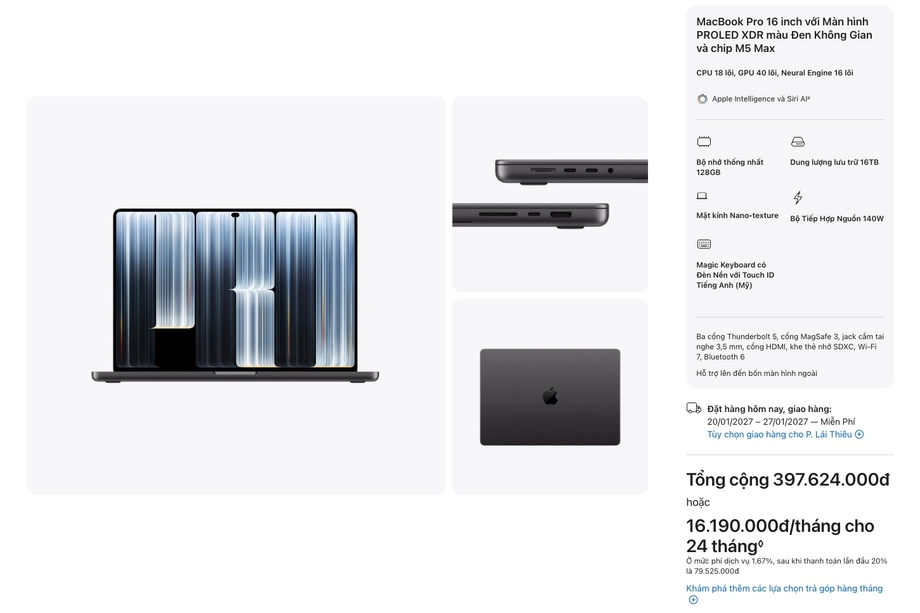
The 397,624,000 dong configuration combines an M5 Max with 18 CPU cores and 40 GPU cores, 128 GB of unified memory, a 16 TB drive and nano-texture glass. That is almost five times the 79,999,000 dong entry price, although the comparison also crosses screen sizes and chip families. Apple has not assigned one delivery date to every order. The estimate at checkout depends on the selected hardware, delivery address and remaining stock.
How the Rollout Reached Vietnam
The Vietnamese opening follows the October launch, when Apple announced the computers on October 28 and began taking advance orders. Customer deliveries and store availability in the United States followed on November 6. The local schedule developed over several weeks:
- October 28, 2026: Apple announced the PROLED XDR models and opened advance orders.
- November 5: Independent testing began detailing the display, touch controls, performance and battery life.
- November 6: Deliveries and retail sales began in the United States.
- November 26: A Vietnamese retail unit was unboxed, while an exact local sales date had yet to be announced.
- November 27: Holiday discounts appeared at American retailers.
- By November 28: Vietnamese orders, prices and delivery estimates were available.
- November 30: Deliveries of the standard 14 inch configuration are scheduled to begin in Vietnam.
- January 20 to 27, 2027: The delivery window shown for the fullest 16 inch configuration at the time of checking.
The product also reverses years of public resistance inside Apple. Steve Jobs argued in 2010 that repeatedly reaching toward a vertical touchscreen was uncomfortable, and the company subsequently kept touch centered on the iPad while Macs retained keyboards and trackpads. The new design preserves those traditional controls and adds the screen as another way to give commands.
Why PROLED XDR Is More Than a Touchscreen
PROLED XDR is Apple's name for the new display and the models built around it. This is the first MacBook with an OLED screen and the first with touch input. Versions using the older Liquid Retina XDR display remain on sale. OLED pixels produce their own light and can switch off individually, so black parts of an image require no backlight. The tandem OLED design stacks two light emitting layers. On older mini-LED screens, lighting is controlled across zones, which can leave a faint halo around subtitles, stars or other small bright objects against darkness.
The actual screen sizes are 14.2 and 16.3 inches. The smaller panel has a resolution of 3,024 by 1,986 pixels, while the larger one offers 3,472 by 2,266 pixels at 254 pixels per inch. ProMotion can vary the refresh rate from 10 to 120 times per second, increasing it for smoother movement and reducing it for relatively static material. Support for the P3 and Adobe RGB color spaces, together with reference display modes, gives photographers and designers tools for checking how colors may appear when published or printed.
Brightness reaches 2,000 nits for high dynamic range video and for standard content viewed outdoors. A nit is a unit of screen brightness. The comparable mini-LED models are rated at 1,000 nits for standard content and 1,600 nits for HDR. Apple also lists a contrast ratio of 10,000,000:1 for OLED, against 1,000,000:1 for mini-LED. At the other extreme, the new screen can fall to 1 nit for reading or watching video in a dark room.
Standard glass retains particularly deep-looking blacks, while nano-texture diffuses harsh overhead reflections but slightly softens black levels and can show fingerprints more readily. The finish costs an extra $150 in the United States or £150 in Britain. An equipment test on one 14 inch unit also measured pulse width modulation at 240 Hz. This is rapid cycling of brightness, separate from the display's refresh rate, and it can cause discomfort for some people who are sensitive to flicker. Buyers with that concern would benefit from viewing the screen in person.
What Can You Do With Touch?
Apple integrated the touch sensor into the OLED panel rather than placing a separate sensing layer above it, an arrangement the company says reduces latency. Testing on macOS 27.2 found no obvious delay when tapping buttons, menus or the Dock, and navigation using fingers alone worked almost all of the time. A single tap selects an item, just as a mouse click does. Opening a file or application still requires a double tap, rather than the single tap familiar from an iPhone or iPad.
The interface makes temporary room for fingers. The three window controls can expand, menu items gain space and checkbox labels become tappable. Those targets contract again when the user returns to a trackpad or mouse. Dynamic Island replaces the old display notch with a smaller camera cutout that can expand for music controls, timers and Live Activities. Its controls can be reached without leaving the document or video already open.
Testing confirmed a substantial collection of gestures directly on the glass:
- Two fingers can scroll vertically or horizontally.
- A three finger swipe to either side switches desktops.
- Four fingers swiped upward open Mission Control, while a downward swipe opens App Exposé.
- Pinching zooms into photographs and other content.
- Turning two fingers against each other rotates an item, although this can feel awkward on an upright screen.
- Double tapping or flicking a window can expand it or snap it into a tiled position.
Apple Maps demonstrates the appeal of direct input: a finger can pan across the map or pinch to enlarge a neighborhood. In Photos, a user can zoom into the exact corner that needs inspection and then use Clean Up around an object. Freeform allows quick marks beside a design, while Pixelmator supports simple sketches made with a finger. Final Cut Pro tells a more mixed story. Dragging a clip or moving along the timeline is easy to understand, but catching the precise edge of a clip or pressing a small tool remains easier with a pointer.
Where the New Controls Still Fall Short
The keyboard and trackpad remain central. Tapping a text field does not summon an onscreen keyboard, and touching a word does not produce the copy and paste controls found on Apple's tablets. One reviewer estimated using the screen only about half a dozen times per day, largely because moving a hand away from the keyboard is inefficient when the trackpad already performs the same navigation. Dynamic Island media controls and swiping in from the edge for Notification Center felt more naturally suited to fingers than ordinary desktop buttons.
Neither Apple Pencil nor a third-party stylus works on the display. Apple describes possibilities such as playing software instruments, drawing and testing how iPhone or iPad applications respond to touch. Early independent testing concentrated instead on navigation, maps, photographs, media controls and simple editing. There were also rough edges: some games had touch buttons that failed to respond, and double tapping a video file sometimes started playback inside its icon rather than opening the file.
The early testing did not cover months of daily tapping, so wear on the hinge and display under sustained use remains unknown. Apple's coating resists oil but does not prevent fingerprints. They tend to disappear while the screen is lit and become visible when it goes dark. A microfiber cloth is therefore useful, particularly for anyone expecting to swipe and pinch regularly.
A Lighter Body and the Return of a Glowing Logo
The 16 inch M5 Pro model weighs 1.82 kg and is 16 mm thick. Its M4 Pro predecessor weighed 2.14 kg and measured 16.8 mm, making the new computer 320 grams lighter, a reduction of about 15%, and 0.8 mm thinner. That difference is easier to notice when lifting the machine with one hand or carrying it in a backpack than it is in a photograph.
An illuminated Apple logo also returns, a decade after Apple removed it during the 2016 MacBook Pro redesign. Older LCD models used light from the screen's backlight. OLED has no such backlight, so the new logo needs its own lighting assembly. A teardown of the 14 inch version found four LEDs along one edge, with a reflective layer and diffuser spreading their light evenly. The white logo brightens and dims with the display.
Apple reinforced and slightly stiffened the hinge to keep the screen steadier during taps while still allowing the lid to open with one hand. Testing still found some wobble under normal pressure, described as noticeable but tolerable and smaller than on a standard MacBook Pro. The 12 MP Center Stage webcam adds stabilization in real time, helping keep a video call image steady if the display moves while someone touches it.
The reviewed 16 inch package contained a 140 W USB-C power adapter, a 2 meter cable connecting USB-C to MagSafe 3 and documentation. Thinner display borders, rounded screen corners and the familiar aluminum body complete a design that looks recognizably like a MacBook Pro until the logo lights up or a finger reaches toward the screen.
Performance, Battery Life and Connections
Paying more does not automatically make every action faster. In Geekbench 7 testing, the less expensive M6 scored about 10% higher than the M5 Pro and M5 Max in tests using one CPU core, a measure relevant to opening applications and other brief tasks. The M5 Pro with 15 CPU cores responded with about 37% higher performance across multiple cores, which matters more for video production, software building and 3D work. In graphics testing, the 16 core M5 Pro GPU scored 39% above the M6, while the M5 Max was 166% higher.
With the same M5 Pro or M5 Max chip, memory and storage, PROLED and mini-LED machines performed approximately the same or within the margin of testing error. The display premium therefore buys the OLED panel, touch, lower weight and other physical changes rather than a faster processor. Maximum capacities of 128 GB of memory and 16 TB of storage also require particular M5 Max configurations.
Apple rates the M6 and the 16 inch M5 Pro at up to 24 hours of battery life, and the 14 inch M5 Pro at about 22 hours. Independent battery testing produced roughly 21.5 hours for the 16 inch machines and 19 hours for the M6. The 14 inch PROLED version lasted about an hour less than its mini-LED counterpart. These figures provide test comparisons, not a guarantee for every workload.
The smaller body retains three Thunderbolt 5 ports, HDMI, an SDXC card slot, MagSafe 3 and a 3.5 mm headphone jack. Thunderbolt 5 reaches 120 Gbps on M5 Pro and M5 Max models, useful for fast external drives and demanding docks. The M6 instead uses Thunderbolt 4 at 40 Gbps. Cooling tests recorded fan speeds reaching 9,072 rpm on PROLED, against 7,826 rpm on the other model. With both set to 6,000 rpm, the 14 inch PROLED machine was about 2 decibels quieter. Its speakers also sounded somewhat deeper in testing, while Apple claims 50% deeper bass.
How Prices and Discounts Compare Abroad
American starting prices are $2,899 for the 14 inch PROLED model with M5 Pro and $3,399 for the 16 inch version. M5 Max configurations start at $4,499 and $4,799 respectively. The March M5 Pro models without PROLED began at $2,199 and $2,699, creating a $700 gap between starting prices at either size. Comparing machines with matching chips, memory and storage produced a smaller premium of roughly $400, a reminder that the basic configurations contain more differences than touch alone.
British pricing starts at £2,900. One 14 inch M5 Pro configuration with 18 CPU cores, 20 GPU cores, 48 GB of memory and a £500 storage upgrade reached £4,200. M5 Max examples started at £5,000 with 48 GB of memory, rose to £5,500 with 64 GB and reached £7,000 with 128 GB. Taking storage to 16 TB lifted the fullest example to £14,000. These figures show why the storage and memory buttons on Apple's ordering page matter as much as the headline price.
American holiday listings on November 27 reduced the entry 16 inch configuration by $200 at Amazon, from approximately $3,400 to $3,200. Savings across configurations reached $327, while a version with 36 GB of memory was discounted by $290 from its $4,799 list price. Those retailer offers do not alter the prices shown to buyers checking out in Vietnam.
Senior editor Lori Grunin assessed the 16 inch machine after testing its display and touch controls.
The display certainly lives up to its billing.
She also praised its practical implementation of touch, color accuracy for professional work and OLED contrast. That assessment matches the broader testing pattern: the screen and lighter chassis are the main attractions, while touch is a useful addition for selected moments.
Which MacBook Pro Makes Sense?
Vietnamese buyers now face three broad choices. The PROLED models supply OLED, touch, Dynamic Island and the lighter body. Existing M5 Pro and M5 Max machines with Liquid Retina XDR retain much of the same computing performance without those physical changes. Separately, the standard M6 model starts at $1,999 in the United States with 16 GB of memory and 1 TB of storage, although that price is not a Vietnamese quotation.
The M6 can be configured with as much as 32 GB of memory and 4 TB of storage. The mini-LED family reaches 8 TB, while selected PROLED M5 Max builds reach 128 GB and 16 TB. Touch is currently documented only for PROLED models. Because its sensor is part of the new display hardware, an older Mac cannot acquire it through a macOS update, and Apple has not announced touch for the other configurations.
An owner of an M1 era or older machine has the clearest reason to consider the complete PROLED package, especially when OLED contrast, lower weight and heavier graphics work all matter. Someone who bought a MacBook Pro within the last couple of years gains little from replacing it primarily for taps and swipes. For Vietnamese customers, the final calculation is concrete: compare the 79,999,000 dong entry machine with the exact upgrades required, then check whether delivery on November 30 or a considerably later estimate fits the purchase.
Key Points
- Vietnamese orders are open, with the standard 14 inch model scheduled for delivery from November 30, 2026.
- Prices range from 79,999,000 dong to 397,624,000 dong before additional software and AppleCare+.
- The fullest configuration includes M5 Max, 128 GB of unified memory, a 16 TB drive and nano-texture glass.
- PROLED XDR introduces tandem OLED, touch input and Dynamic Island to the MacBook Pro.
- The display reaches 2,000 nits, while ProMotion varies from 10 to 120 Hz.
- Touch supports familiar gestures but does not replace the keyboard, trackpad or stylus-based tablet workflows.
- The 16 inch M5 Pro version is 320 grams lighter than its M4 Pro predecessor, and the illuminated Apple logo returns.
- International testing and pricing suggest that OLED and the lighter design, rather than touch alone, are the strongest reasons to upgrade.