
A new screen, a lighter laptop and a $400 premium
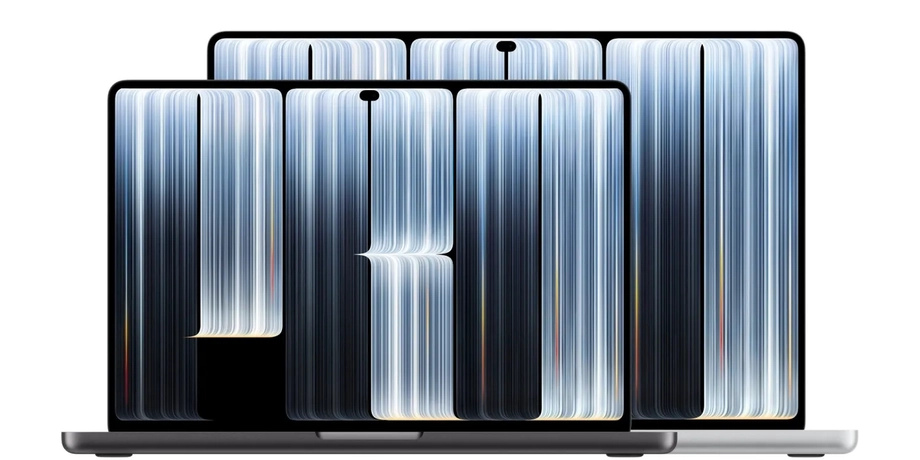
Apple has introduced 14-inch and 16-inch MacBook Pro models with touchscreen PROLED XDR displays, Dynamic Island and a returning illuminated Apple logo. Announced on October 28, 2026, the laptops start at $2,899 and $3,399 in the United States, with November 6 listed as the launch date.
Contents
- A new screen, a lighter laptop and a $400 premium
- When do orders and deliveries begin?
- What makes PROLED XDR different?
- Brightness and color need a closer look
- Touch adds shortcuts rather than replacing the trackpad
- Dynamic Island gives the camera area a job
- A lighter body without dropping the ports
- Performance stays familiar, while upgrades get expensive
- Battery and sound bring a more mixed picture
- Key Points
The biggest change reaches beyond the ability to tap the screen. Apple has replaced the mini-LED display with tandem OLED technology, allowing a thinner display assembly and a lighter computer while retaining M5 Pro and M5 Max processors. The new models cost about $400 more than comparable MacBook Pro configurations with the older display.
Early reviews published on November 5 point to a common conclusion: the OLED panel is the main attraction, while touch is useful for occasional tasks such as enlarging a photograph, moving through a video or interacting with a mirrored iPhone. The keyboard and trackpad remain central to everyday work.
Apple rates peak brightness at 2,000 nits and offers configurations reaching 128GB of unified memory and 16TB of storage. Those maximum capacities require particular M5 Max configurations, rather than being available across the range.
The announcement also creates a choice within the MacBook Pro family. Buyers can pay more for the new display and lighter body, choose an existing M5 Pro or M5 Max model with mini-LED, or consider the separately announced standard M6 laptop.
When do orders and deliveries begin?
Apple opened preorders on October 28, with customer deliveries and store availability scheduled for November 6. One early review instead described online sales beginning November 6 and shipping at least two weeks later, so buyers should check the delivery estimate attached to their particular order.
The launch unfolded across several dates:
- October 19, 2026: Apple teased its Pro and Tell experience.
- October 28: Apple announced the touchscreen MacBook Pro and opened preorders.
- November 5: Early reviews appeared, covering display quality, touch controls, performance and battery life.
- November 6: The announced date for customer deliveries and retail availability.
Both sizes come in silver or space black, with standard glass or an optional nano-texture finish. Existing MacBook Pro configurations without touch remain available at their previous prices.
The touchscreen launch follows the M6 MacBook Pro announcement, which introduced a separate 14-inch model starting at $1,999 in the United States and ¥339,800 in Japan. That machine retains the familiar display and body. The touchscreen models instead combine a redesigned display and chassis with the more powerful M5 Pro and M5 Max chip families.
What makes PROLED XDR different?
Apple's PROLED XDR name brings together tandem OLED hardware, a display engine and factory calibration. OLED pixels produce their own light, so the screen needs no separate backlight. Individual pixels can switch off for black areas, producing deep blacks without the faint halos that can surround bright objects on a display using local dimming zones.
Tandem OLED uses stacked light emitting layers. Apple pairs this arrangement with algorithms that adjust individual pixels according to the image, temperature, ambient lighting and how heavily the panel is being used. The company says those adjustments happen with sub-millisecond precision.
The 14.2-inch panel has a resolution of 3,024 by 1,986 pixels, while the 16.3-inch version has 3,472 by 2,266 pixels. Both deliver 254 pixels per inch. The larger screen is slightly bigger than the previous 16.2-inch display.
Apple lists a contrast ratio of 10,000,000:1, compared with 1,000,000:1 for the existing Liquid Retina XDR models. Contrast describes the distance between the darkest and brightest parts of an image. For photographers and video editors, stronger contrast can make shadow detail and bright highlights easier to judge.
ProMotion adjusts the refresh rate between 10Hz and 120Hz. A higher rate makes movement and scrolling look smoother; a lower rate reduces unnecessary screen updates when the picture changes slowly.
Brightness and color need a closer look
Apple's 2,000-nit figure describes peak brightness for HDR content and SDR content outdoors. A nit measures how much light a display produces. Sustained brightness across the full screen is listed at 1,000 nits, so the peak figure applies under particular viewing conditions.
Peak HDR brightness rises from 1,600 to 2,000 nits, an increase of 25%. Maximum outdoor SDR brightness doubles from 1,000 to 2,000 nits. Sustained full-screen HDR brightness stays at 1,000 nits, making outdoor visibility and very bright highlights the larger changes in the specifications.
The display supports P3 and Adobe RGB, with expanded coverage of green and cyan shades, and Apple says it covers more than 80% of Rec. 2020. These names describe different ranges of colors. Adobe RGB is particularly relevant to photography and print work, while Rec. 2020 is used in advanced video workflows.
Apple also lists 1% reflectance for the standard glossy display. The optional nano-texture glass costs $150 in the United States and targets glare under bright lighting. Reviewers found fingerprints remained an issue, including with the optional finish.
The display engine tracks individual pixel use over time and compensates to preserve image quality. Long term durability results are not yet available, an important practical consideration for people who keep editing timelines, toolbars or other fixed elements onscreen for many hours.
Touch adds shortcuts rather than replacing the trackpad
Apple has built the touch sensor directly into the display panel instead of placing a separate sensing layer over it. The company says this reduces delay between a finger movement and the response onscreen. A redesigned hinge helps steady the display during taps, while video stabilization smooths the camera feed during touch interactions.
Apple describes gestures for scrolling, zooming, moving presentation slides and arranging windows. Its apps support touch from launch, and macOS translates taps into mouse clicks so many existing applications can respond without a complete redesign.
Reviewers found that approach useful for brief, direct actions. Enlarging a particular part of a photograph, selecting a point on a video timeline and letting another person tap something during a shared demonstration were recurring examples. Touch also makes iPhone Mirroring feel more familiar, allowing gestures such as swiping upward inside a mirrored phone app.
Technology reviewer David Pierce described the experience of returning to ordinary work after trying the new controls:
But I keep forgetting that as I go about my day, I can now reach out and poke the screen.
The limitations are concrete. There is no onscreen keyboard, no familiar text selection menu that appears when tapping words, and no Apple Pencil support. Some game buttons failed to respond to touch during testing, while controls that depend on hovering a pointer still require another input method.
Several reviewers also reported arm fatigue during prolonged use. The laptop does not fold into a tablet, and touch can be switched off through Accessibility settings. Developers can add richer gestures through updated APIs, but early reviews found relatively few applications built specifically around the new input.
Dynamic Island gives the camera area a job
Dynamic Island replaces the previous camera notch with an area that can expand to show information and controls. Apple places Spotlight, Live Activities and Siri AI there, alongside Now Playing controls.
Live Activities from a paired iPhone can also appear in the island. A click or tap expands supported items, giving users access to information without opening a full application window or searching through the menu bar.
Technology reviewer Jason Snell described the practical difference between the old cutout and the new interface:
The Dynamic Island serves a purpose and the MacBook Pro is better for it.
The camera remains a 12-megapixel Center Stage model with Desk View and 1080p video. Authentication still uses Touch ID. Apple has not added Face ID or built-in cellular connectivity to these models.
A lighter body without dropping the ports
The 14-inch M5 Pro model weighs 3.0 pounds, down from 3.5 pounds for its comparable predecessor. The 16-inch M5 Pro falls from 4.7 to 4.0 pounds. Those figures represent reductions of about 14% and 15%, respectively. M5 Max versions are slightly heavier, at 3.1 and 4.1 pounds.
Thickness drops from 0.61 to 0.59 inches on the smaller model and from 0.66 to 0.63 inches on the larger one. Removing the separate display backlight helped create room for the thinner design, alongside changes elsewhere in the chassis.
Apple has retained three Thunderbolt 5 ports, HDMI, an SDXC card slot, MagSafe 3 charging and a headphone jack. Wireless connections include Wi-Fi 7, Bluetooth 6 and Thread, with Wi-Fi 7 availability varying by country or region. M5 Pro supports up to three external displays; M5 Max supports up to four.
The illuminated Apple logo returns after disappearing from the MacBook Pro with the 2016 redesign. Its brightness follows the display brightness and ambient lighting. Because OLED has no backlight to illuminate the lid, Apple needed a different lighting arrangement.
Apple says the laptops contain 55% recycled material, compared with 45% for the existing design, a rise of 10 percentage points. Packaging is entirely based on fiber.
Performance stays familiar, while upgrades get expensive
M5 Pro and M5 Max are the same processor families used in the existing premium MacBook Pro models. Early testing found performance close to comparable machines, with the redesigned cooling system maintaining speed inside the thinner body and directing heat away from the OLED panel.
The entry 14-inch configuration has a CPU with 15 cores, a GPU with 16 cores, 24GB of unified memory and a 1TB SSD. A higher M5 Pro option provides 18 CPU cores and 20 GPU cores. Unified memory is a shared pool used by the processor and graphics hardware.
M5 Max offers GPUs with 32 or 40 cores. Memory bandwidth, the rate at which data moves between the chip and memory, reaches 614GB per second on the top version. The 128GB memory option requires that GPU with 40 cores, while storage above 4TB is restricted to M5 Max.
Each GPU core includes a Neural Accelerator for AI workloads, and the chips also have a Neural Engine with 16 cores. These resources can help run AI models on the computer itself, alongside demanding graphics tasks. Dedicated media hardware handles formats including ProRes, H.264 and HEVC.
M5 Max models start at $4,499 for the 14-inch and $4,799 for the 16-inch. A frequently tested 14-inch M5 Pro configuration with 48GB of memory and 1TB of storage costs $3,699. Another tested configuration, a 16-inch M5 Max with 128GB of memory and 2TB of storage, costs $7,549.
The $400 premium over the comparable $2,499 mini-LED entry model is about 16%. Buyers paying that difference receive the OLED display, touch, Dynamic Island and lighter design, while processing performance remains similar at matching chip specifications.
Battery and sound bring a more mixed picture
Apple's longest battery rating, up to 24 hours of video streaming, applies to the 16-inch M5 Pro. Its wireless browsing rating is up to 17 hours. The 14-inch M5 Pro is rated for up to 22 hours of streaming and 14 hours of browsing; M5 Max configurations have lower ratings.
Review testing produced different results under different workloads. Joe Osborne recorded 24 hours and 48 minutes in a battery test of the 14-inch model. Kyle Kucharski reported more than 13 hours with a 16-inch M5 Max during use that included video calls. Other early reviewers were still completing formal battery testing.
Fast charging reaches 50% in about 30 minutes with suitable equipment. The 14-inch requires a charger rated at 96W or higher for fast charging, while the 16-inch requires 140W or higher. The entry 14-inch configuration includes a 70W adapter, making charger choice relevant to buyers expecting the advertised charging speed.
Apple has redesigned the six-speaker system, which uses four woofers and two tweeters, and advertises 50% deeper bass. Reviewers welcomed the impact during films but were less consistent about music, podcasts and speech. Some found the sound too boomy compared with earlier MacBook Pro speakers.
The early buying picture is therefore fairly specific: the new display and lower weight are the strongest reasons to choose this version. Touch adds convenient actions, while matching M5 configurations with mini-LED remain a cheaper route to similar computing power.
Key Points
- Apple announced the touchscreen MacBook Pro on October 28, 2026, with November 6 listed as the launch date.
- U.S. prices start at $2,899 for the 14-inch and $3,399 for the 16-inch, about $400 above comparable mini-LED models.
- Tandem OLED brings 2,000-nit peak brightness, broader color support and Dynamic Island.
- M5 Pro versions weigh 3.0 and 4.0 pounds, with ports retained.
- Touch supports occasional direct interactions, but there is no Apple Pencil support or tablet conversion.
- Maximum configurations offer 128GB of memory and 16TB of storage, with restrictions tied to the chip selected.
- The 24-hour battery rating applies to video streaming on the 16-inch M5 Pro.