
Japanese Siri moves from answering questions to completing tasks
Apple has begun releasing its Japanese Siri AI beta with software version 27.2, allowing eligible users to search their messages, emails and photos, ask follow-up questions and request actions inside apps. Apple dated its announcement October 26, 2026; the release reached Japan on October 27, Japan time.
Contents
- Japanese Siri moves from answering questions to completing tasks
- Which iPhones qualify, and how does access begin?
- Personal searches reach more of the phone
- Japanese apps connect searches with actions
- Screen awareness keeps the conversation in context
- A camera question can become a calendar entry
- Writing tools and conversations travel across devices
- Apple links Gemini models with its privacy architecture
- Daily limits and regional rules shape availability
- The update also brings security and everyday app changes
- Key Points
The update adds Japanese, French, Korean, Portuguese and Spanish to the previously available English, bringing Siri AI to six languages. It arrives across iOS, iPadOS, macOS, watchOS and visionOS, although access depends on the device, language, region and completion of a gradual rollout.
Apple's Japanese launch announcement describes an assistant that can connect information scattered across different apps. In one example, Siri finds a friend's barbecue suggestion in Messages, retrieves a list of ingredients from a group email and adds the user's assigned items to a shopping list in Reminders.
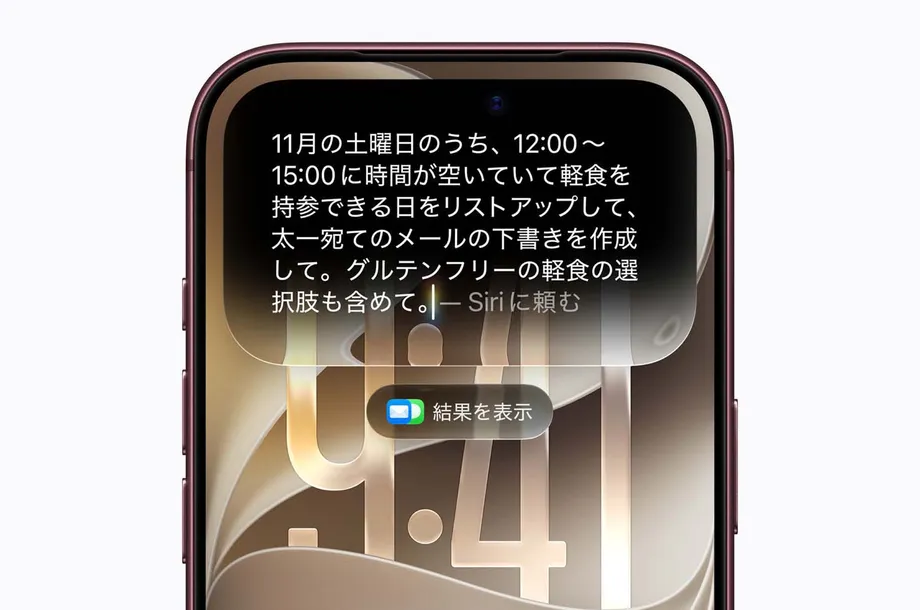
For users, the practical change is fewer separate searches and less copying between apps. Instead of remembering which conversation contained a plan, a person can ask about the plan itself, then request the next action. Apple also describes support for drafting emails, editing or sharing photos and turning information on a website into calendar entries.
The operating system update is a general release, while Siri AI remains a beta. Access may require a wait after installation, and some functions that use servers have daily limits. Apple plans to sell expanded access in the future, making usage allowances another part of the launch alongside language and device support.
Which iPhones qualify, and how does access begin?
Siri AI supports iPhone 15 Pro, iPhone 15 Pro Max and all iPhone 16 models and later. The compatible lineup also includes iPhone Air and iPhone Duo. Owners of an iPhone 15 or iPhone 15 Plus can install iOS 27.2, but those two models cannot use Siri AI.
Japanese access requires Apple Intelligence to be enabled and both the device language and Siri language to be set to Japanese. On an iPhone, the software update is available through Settings, General and Software Update. Siri settings then provide the option to begin the beta setup.
Users may need to complete voice and privacy settings and join a waiting list. Required data downloads automatically as access becomes available, and a notification tells users when they can begin. Waiting times vary. A download size of 12.12GB was recorded for the update, so users should check the size displayed on their own device before installing.
The launch follows several stages:
- June 2026: Apple announced Siri AI, combining Siri with Apple Intelligence.
- Initial release: Siri AI became available in English.
- October 26, 2026, United States time: Apple released version 27.2 and announced five additional Siri AI languages.
- October 27, Japan time: The update reached Japanese users, with beta access opening gradually.
Personal searches reach more of the phone
Siri AI can use personal context, meaning information connected to the user's own activities and conversations. Alongside messages, emails and photos, the update expands searches involving pictures attached to Messages, Calendar event attendees and voicemail. Searches drawing on Safari history and Reading List also improve.
A person can ask about a restaurant Siri recommended the previous week rather than start the same discussion again. The assistant can recall earlier conversations, while the dedicated Siri app provides a place to review those exchanges or type a new question.
Apple also adds an Excluded Apps setting, where users can choose which apps Siri, Search and suggestions may access. This puts control over the information used by those services in one place. Users can also select and copy a specific passage from a Siri response instead of copying the entire answer.
Japanese apps connect searches with actions
Yahoo! Transit, known in Japan as Yahoo!乗換案内, is among the services Apple names for Siri AI. A user can ask for a route to the location of an upcoming meeting. Apple also identifies FirstSeed Tasks for adding tasks and Kotoba for finding and editing notes.
WhatsApp and Audible remain examples of supported apps for established Siri actions, such as sending a message or playing an audiobook. Apple says users can find more apps supporting Siri AI in the App Store.
These connections give the assistant somewhere to carry out a request after finding the relevant information. The barbecue example joins a conversation, an email and a shopping list; the transit example connects a destination with a journey planner. Support still depends on the actions each app makes available.
Japanese users should also check individual feature availability. Automatic suggestions in Messages, such as proposing a Calendar invitation from a dinner conversation, are listed for English in nine regions, with Japanese outside that list. Japanese Siri requests and automatic Messages suggestions therefore have different language coverage.
Screen awareness keeps the conversation in context
Siri AI can answer questions about content displayed on the screen and act on that content. Apple gives the example of a wedding website: a user can ask Siri to add the weekend's events to Calendar, including their locations, rather than entering each event separately.
Follow-up questions can continue from the answer just given. In Apple's example, a person asks about a hiking route in Hakone recommended by a friend in Messages, then asks how long it takes and whether it is suitable for children.
Apple says Siri AI also draws on information across the web for current answers, including football scores, travel planning and local cafe searches. This combines two kinds of information in one conversation: details from the user's own apps and information about the wider world.
On iPhone, users can start Siri by saying "Hey Siri," holding the side button or swiping down from Dynamic Island. On iPad and Mac, Siri AI is integrated into Spotlight search. Context menus also provide a route to questions about selected images, files and text.
A camera question can become a calendar entry
Visual intelligence extends Siri's work to images and objects. The term describes the ability to interpret visual content alongside words, so a user can point to something and ask about it rather than first describing every detail.
On iPhone, a Siri mode is built into the Camera app. Apple illustrates it with a music festival poster: users can ask when a favourite artist will perform and have Siri create calendar events for performances across the weekend. Other examples include calculating how to split a bill and asking about the nutritional content of food.
On iPad, visual intelligence is integrated into the screenshot experience. On Mac, a dedicated keyboard shortcut lets users select something on the screen and type a question about it. These routes adapt the same idea to how each device is normally used.
Apple Vision Pro gains visual intelligence for both app windows and objects in the surrounding space. Apple also says users can activate Siri by looking at its spatial representation and beginning to speak. The assistant's entry point therefore changes from a phone button or keyboard command to gaze and voice.
Writing tools and conversations travel across devices
Siri AI's writing tools can generate a draft from a description, revise existing text according to instructions and offer suggestions about writing. Apple says they work in almost any place where users can enter text, extending their reach beyond a separate assistant window.
Mail and Messages can adapt drafts to the way a user normally writes to a particular recipient. Apple identifies punctuation and tone as examples, so the requested wording can reflect an existing conversation style. Apple Intelligence also adds automatic proofreading while users type across the system, including in many apps from other developers.
The dedicated Siri app keeps previous conversations together and supports starting new ones. Apple says conversation history syncs privately through iCloud across iPhone, Mac, iPad, Apple Watch and Apple Vision Pro, allowing a discussion begun on one device to continue on another.
For someone planning a trip on a Mac and later checking details on an iPhone, that continuity can reduce the need to repeat a request. The conversation history and the assistant's ability to recall previous answers provide two ways to return to earlier planning.
Apple links Gemini models with its privacy architecture
Apple says the new functions use a next generation Apple Foundation Model built through collaboration with Google and its Gemini models. A foundation model is the underlying AI system that interprets requests and generates responses; Apple's operating systems connect that system to information and actions on the device.
Requests are processed either on the device or through Apple's Private Cloud Compute infrastructure. Processing on the device means the work happens locally. Private Cloud Compute handles requests on servers when cloud processing is needed.
Apple says personal data used during Private Cloud Compute processing is neither stored nor accessible to Apple or anyone else. The company also says outside experts can inspect the system to check its privacy commitments.
Some core tools remain entirely on the device, including the Spotlight index and App Toolbox. Apple describes a system orchestrator that coordinates these resources. In simple terms, it helps connect a request with the information or app function needed to complete it.
Daily limits and regional rules shape availability
Apple applies daily usage limits to some features that depend on server models. Siri AI is among them, alongside intelligent photo editing tools, Image Playground and the AFM 3 Cloud model in Shortcuts. The allowance can vary with the feature, request complexity, system demand, policies and other factors.
Expanded access will be offered for payment in the future. Apple has not announced a fixed daily allowance, subscription price or launch date for that paid access. A complex request and a simple request may therefore be subject to different usage conditions.
Children younger than 13 cannot use Siri AI. Apple says the service is currently unavailable in the European Union on iOS, iPadOS and watchOS, and that it is working with the EU on making access possible. Launch information also lists mainland China as outside the service area.
Apple Intelligence has broader language support than Siri AI's six languages. Its list includes simplified and traditional Chinese, Danish, Dutch, German, Italian, Norwegian, Swedish, Turkish and Vietnamese. Users need to check the language support for the particular function they intend to use.
The update also brings security and everyday app changes
iOS 27.2 and iPadOS 27.2 include security entries covering 163 distinct CVE identifiers after duplicates are removed. CVE identifiers are public reference numbers used to track security flaws. The count comes from the combined security information for the two operating systems, with affected hardware varying by entry.
The fixes address issues involving unauthorised Bluetooth and camera access, exposure of an email address when using Hide My Email, access to sensitive Apple Intelligence data and malicious web content capable of running code. The security changes also matter to supported phones that cannot run Siri AI, including iPhone 15 and iPhone 15 Plus.
Photos gains shared album improvements, including editing captions and comments, preventing duplicate additions and reminders to save pictures before an album expires. Photos and Image Playground also add SynthID support, embedding an invisible digital watermark in many images generated or edited with Apple's AI tools to help identify their origin.
Podcasts separates New Episodes from Continue Playing on its Home tab. Apple TV adds individual household profiles for personalised recommendations, while Games provides more context for friend suggestions and shows recently played games on player pages. FaceTime adds support for bringing an outside sign language interpreter or live caption provider into a call.
iPhone Duo also gains Apple Pencil support through USB-C and automation triggered by opening or closing the device. Those additions are specific to its hardware, while the Japanese Siri AI launch reaches the wider group of compatible iPhones.
Key Points
- Japanese Siri AI began rolling out with version 27.2 on October 26, 2026, United States time, or October 27 in Japan.
- Siri AI now supports six languages and remains a beta, with access opening gradually.
- Compatible iPhones include iPhone 15 Pro and Pro Max, all iPhone 16 models and later, iPhone Air and iPhone Duo.
- The assistant can search personal information, use screen and camera content, write text and perform supported app actions.
- Apple says processing takes place on the device or through Private Cloud Compute, with controls for excluding apps.
- Some server functions have daily limits, and paid expanded access is planned.
- Regional and age restrictions apply, while the update also includes security fixes and changes to everyday apps.