
iPhone Testers Gain a New Way to Send Messages Later
WhatsApp is rolling out scheduled messages to selected iPhone beta testers using iOS version 26.42.10.19 through TestFlight. The feature lets users arrange delivery between 10 minutes and two weeks ahead, with messages sent at the chosen time even if the sender's phone is offline or the app is closed.
Contents
- iPhone Testers Gain a New Way to Send Messages Later
- From February Development to October Testing
- How the Scheduling Controls Work
- Delivery Continues When the Sender Is Offline
- Text, Links and One Media Item at a Time
- Where to Review and Cancel Queued Messages
- Groups Use Membership at the Time of Scheduling
- Encryption Remains Part of Scheduled Messaging
- Key Points
The October 2026 expansion follows testing on Android earlier in the month. It brings the same basic scheduling controls to both platforms, including support for individual conversations and groups, text, links, photos and videos.
Two details shape how the feature works in practice. Each scheduled message can contain only one photo or video. In groups, delivery is limited to people who were members when the message was scheduled, so someone joining before it is sent will still miss it.
Access remains limited to selected testers. Installing the compatible beta does not automatically unlock scheduling, and users cannot manually enable it. More testers are expected to receive access over the coming weeks. WhatsApp has not announced a public release date for either iOS or Android.
The gradual Android rollout is described in reports, but no WhatsApp statement or documentation is provided to substantiate the rollout details or explain how testers are selected. The reports do not establish the selection criteria or confirm the stated timetable for expanding iOS access.
From February Development to October Testing
Evidence of message scheduling first appeared on iOS in February 2026, months before selected users could try it. Android testers gained access first, followed by the current iPhone rollout.
Reports describe sightings of scheduling on iOS devices enrolled in the TestFlight beta programme in February, but do not provide the underlying code references. A report dated October 12, 2026, identifies Android beta version 2.26.40.7 as a compatible update for a rollout limited to some beta accounts. Installing that version does not guarantee access.
The development timeline shows the difference between a feature appearing in an app's code and becoming usable. Early references indicated work was underway; the October releases put scheduling controls into the hands of selected testers.
- February 2026: Evidence of scheduled messages appeared in the iOS app during development.
- Early October 2026: Selected Android beta users began receiving scheduling, with version 2.26.40.7 identified as a compatible update.
- October 2026: Access began expanding to selected iPhone testers through TestFlight version 26.42.10.19.
- The coming weeks: Additional iOS beta accounts are expected to receive the feature gradually.
How the Scheduling Controls Work
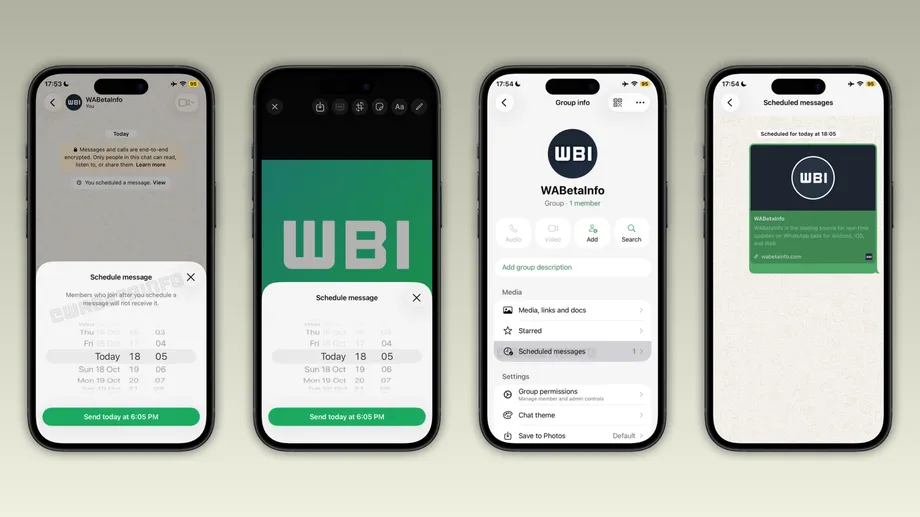
Users with access start inside an ordinary conversation. After typing a message, they press and hold the send button to open a screen for choosing a delivery date and time.
A green confirmation button at the bottom displays the exact delivery time. That gives the sender a final opportunity to check when the message is due before placing it in the queue. WhatsApp then shows a confirmation inside the conversation, visible only to the person who scheduled it.
The minimum delay is 10 minutes. The maximum is two weeks, or 14 days. Someone can therefore prepare a message for later that morning or a birthday greeting several days ahead, while a greeting for a birthday a month away falls outside the current window.
The feature changes the action required at delivery time. Instead of setting an alarm, reopening WhatsApp and pressing send, the user completes the sending arrangements in advance. The message waits for its selected time.
Delivery Continues When the Sender Is Offline
WhatsApp handles the scheduled send even when the sender's iPhone is disconnected from the internet at the appointed time. The app can also be closed. Users therefore do not need to keep the conversation open while waiting for delivery.
A birthday greeting illustrates the practical change. A sender could prepare it during the evening, choose midnight and go to sleep without keeping the phone connected for the scheduled send. A work reminder could similarly be written ahead of its intended delivery time.
Scheduling gives the sender control over when WhatsApp sends a message. The recipient still chooses when to open and read it. For people preparing announcements or reminders, the useful change is removing the need to return to the app at an exact moment.
The same arrangement makes reviewing queued messages worthwhile when plans change. Once a message has been scheduled, closing the app or leaving the phone offline will not stop its scheduled delivery.
Text, Links and One Media Item at a Time
Scheduled messages support text and links as well as photos and videos. For visual media, users press and hold the send button inside the drawing editor, the screen used to prepare a photo or video before sending it.
The current limit is one photo or one video per scheduled message. Several images cannot be bundled into a single scheduled send. Each media item needs its own scheduled message.
For example, sending four photos later would require four separate scheduling actions, compared with one action for a single photo. That extra work matters for anyone preparing a collection of images rather than a short greeting or reminder.
WhatsApp's current test therefore supports a range of everyday message types, while requiring more preparation for multiple photos or videos. A sender arranging several media messages will need to check the selected time for each one.
Where to Review and Cancel Queued Messages
WhatsApp places pending messages in a dedicated scheduled messages section. For a private conversation, users reach it through chat information. For a group, the equivalent section is available through group information.
The list lets senders review messages waiting to go out and delete them at any point before delivery. Cancellation does not produce a notification for the recipient. The scheduling confirmation shown earlier in the conversation is also visible only to the sender.
Those controls give users a way to respond to changed arrangements. Someone who has prepared a reminder for an event that is later cancelled can remove it from the queue before WhatsApp sends it.
Viewing and deletion are described in the current test, while an option to edit a queued message has not been specified. To change the wording or delivery time, users may need to delete the existing scheduled message and create another.
Groups Use Membership at the Time of Scheduling
WhatsApp supports scheduling in groups, but it fixes eligibility around membership when the sender creates the scheduled message. People who join afterward will not receive it, even if they become members before the delivery time.
Consider a reminder scheduled on Monday for delivery on Friday. A person joining the group on Wednesday would miss that scheduled reminder because they were absent when it was created. For a group whose membership changes frequently, this rule can affect who receives an announcement.
A sender who needs newcomers to receive information will therefore need to account for people joining after the message was scheduled. Preparing a message days ahead can save time, but the intended audience may change during that interval.
The rule is particularly relevant to groups used for events, classes or temporary arrangements. A message prepared for the original membership will not automatically reach everyone who joins before it goes out.
Encryption Remains Part of Scheduled Messaging
Scheduled messages retain WhatsApp's end-to-end encryption. In simple terms, this protects message content so that it can be read by the sender and intended recipients rather than by the service carrying it.
That protection accompanies the new delivery timing controls. Users can prepare supported messages in advance while keeping the encryption used for their WhatsApp conversations.
Privacy also extends to the scheduling process inside the chat. Only the sender sees the confirmation that a message has been queued, and recipients receive no cancellation alert if the sender deletes it before delivery.
For users who gain access, the most consequential details are practical: check the delivery time, review messages when plans change, schedule media separately and remember that later group members will miss a message created before they joined.
Key Points
- Scheduled messages are reaching selected iPhone beta testers through TestFlight version 26.42.10.19.
- Delivery can be arranged from 10 minutes to two weeks ahead, even when the sender's phone is offline.
- Text, links, photos and videos are supported, with one photo or video per scheduled message.
- Pending messages can be reviewed and deleted through chat or group information without notifying recipients.
- People joining a group after a message is scheduled will not receive it.
- Scheduled messages retain end-to-end encryption. Public release dates for iOS and Android have not been announced.