A new kind of phone call
For much of his life, Alfred Yeo, deaf since age five, saw incoming calls as a dead end. He could not hear the caller, could not answer questions from a bank officer, and could not resolve issues with an agency hotline. Now he can pick up and reply. CallBridge, a Singapore built app, turns speech into text for the deaf user and converts typed replies back into clear speech for the hearing caller. It removes a basic barrier that kept many deaf and hard of hearing people from using phones for daily needs.
- A new kind of phone call
- How CallBridge works
- Why Singapore needed its own solution
- Voices from the community
- Reducing hang ups and call drop offs
- Where to get it and what comes next
- How it compares to other accessibility options
- Challenges that remain
- What this means for accessibility in Singapore
- Key Points
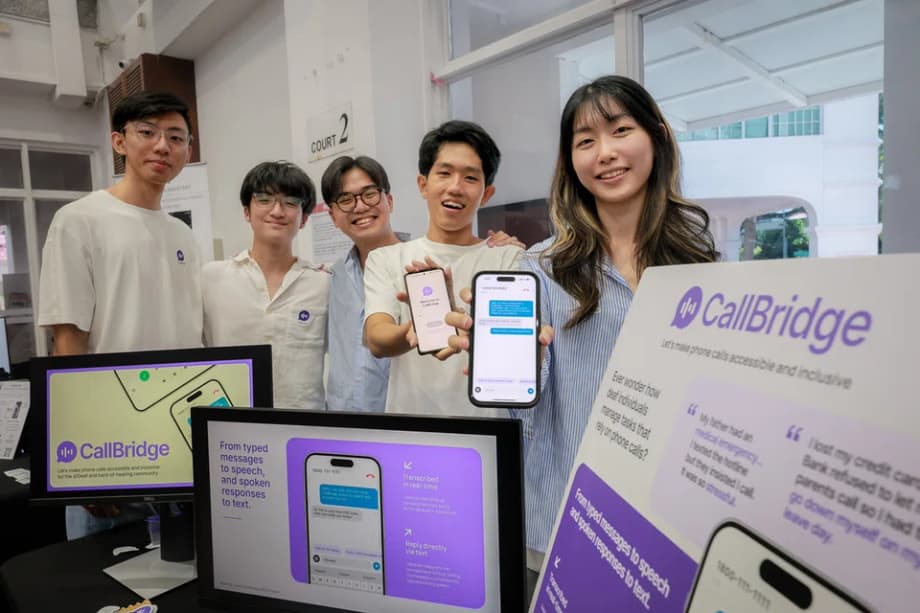
The app alerts users when a call comes in, transcribes what the other person says in real time, and lets the deaf user type a response that an artificial voice reads aloud. When a CallBridge user makes an outbound call, the recipient hears a polite introduction that explains they are speaking with a deaf person. It asks them to expect a little extra time while the user types. That simple context has been shown to reduce confusion and keep people on the line.
Singapore has a large group that stands to benefit. The Singapore Association for the Deaf estimates that around half a million people in the country have some degree of hearing loss, yet only about 5,400 are registered with the association. Many services still rely on phone calls for verification, support, or urgent help. For deaf users, that can mean long delays or dependence on others. CallBridge aims to give them a direct line, with privacy and independence.
How CallBridge works
CallBridge combines speech to text and text to speech so a deaf user can carry a natural phone conversation. The app handles both sides of the exchange. On the deaf user’s screen, spoken words appear as text. On the hearing person’s end, the deaf user’s typed replies are spoken in a natural voice. The goal is to make these calls feel as close to standard phone calls as possible.
Core features
- Introduction message: An automatic introduction at the start of each call explains that the caller is using CallBridge and may need a moment to type.
- Quick replies: Users can set short preset phrases to speed up common responses.
- Number pad support: The app works with automated call centers that ask callers to press numbers, so users can navigate menus that do not accept voice input.
- Natural local voice: The team partnered with ElevenLabs to create a Singaporean sounding voice, which reduced early hang ups caused by robotic delivery.
- Typing sound: Optional keystroke sounds reassure the recipient that a response is on the way during pauses.
During a call
- An incoming call triggers a push notification. The user taps to answer in the app.
- Spoken words from the caller are transcribed in real time. The deaf user reads and types a reply.
- The app turns that text into speech. The hearing person listens as if it were a typical call.
- If the deaf user dials out, the recipient first hears the introduction message. This encourages patience while the user types.
These pieces work together to keep calls flowing. The transcription handles everyday speech. The quick replies and number pad help with queue systems and verification steps. The local voice and introduction message set expectations that reduce abrupt hang ups.
Why Singapore needed its own solution
Apps with similar aims exist overseas, including Nagish and InnoCaption. They are not available in Singapore. Availability depends on market support, telecom integrations, and other service decisions. For many here, there simply was no direct way to make and receive phone calls independently with captioning and spoken replies.
That gap motivated a local team to build CallBridge during the Sparks x Build for Good Community Hackathon, organised by the People’s Association and Open Government Products (OGP). The project was selected for the Build for Good accelerator, where the team received funding, mentorship, and access to agencies for pilot tests. Early on they visited Deaf Hangouts and met users to understand daily barriers. Those sessions shaped the product, from onboarding flows to the tone of the introduction message and even the choice of voice.
Users told the team that many banks, telcos, and government hotlines still rely on phone only help. Email or text channels can be slow. Hiring an interpreter is not always possible, can be costly, and may not be ideal for private matters. CallBridge was designed to fill that gap by giving deaf users a way to talk directly with any phone number.
Voices from the community
Alfred Yeo now uses the app to call friends, sort out delivery drop offs, and even message a driver who is searching for his pickup point. He says the difference is practical and personal. Instead of relying on someone else, he can speak for himself in day to day interactions.
One pilot user in the Singapore trial described the feeling of completing a simple errand independently.
“I called the bakery and they answered my question, it felt quite accomplishing.”
Another pilot user shared a sense of independence after trying the app in a work setting.
“I do not need to depend on anyone. I can just access this tool without any worries.”
Early pilots are small by design, but they already show how direct phone access can expand choices. The team reports that 10 deaf users were onboarded in the initial pilot, including employees from the Singapore Association for the Deaf, and that the pilot group successfully completed dozens of calls within the first two weeks.
Reducing hang ups and call drop offs
Early tests surfaced a clear pattern. If the artificial voice sounded robotic or if a pause stretched too long while the user typed, the hearing recipient was more likely to hang up. The team responded by switching to a Singaporean sounding voice using ElevenLabs models and refining the introduction message at the start of calls.
They also added typing sounds and taught users to rely on shorter sentences and quick replies for common answers. On the translation side, they worked to improve handling of names and numbers, which are easy to miss in automated transcription. These steps aim to raise pickup rates and keep people engaged long enough for the caller to finish their task.
On the service side, pilot calls with helpline staff helped target training where it matters. The team ran simulated calls with staff at public agencies so frontline teams could practice responding. They plan to expand this into certification for hotline staff who are likely to receive CallBridge calls, which would reduce confusion and make calls faster for both sides.
Where to get it and what comes next
CallBridge began as a private pilot available via a sign up link. It is now rolling out on app stores, and the Android version is available on Google Play. The team has said it is targeting a broader launch in November, with performance tweaks and interface refinements already shipping. Interested users can join the waitlist and learn more at callbridge.sg.
Today the app supports English. Additional languages are on the roadmap so users can communicate in the language that fits their context. That will help in multilingual households and with businesses that serve customers in different languages.
Planned improvements include Singpass verification to build trust around caller identity, further hotline trials with agencies like NAVH and Mindline, and a phase two partnership with the People’s Association to train and certify helpline staff. The team is also discussing outreach with the Singapore Association for the Deaf to reach more members and exploring collaborations with telcos for plans tailored to deaf users.
How it compares to other accessibility options
Deaf and hard of hearing people use many workarounds to reach services that expect phone calls. Text messaging, email, and chat work for some tasks, yet many essential services still ask customers to call. Asking a family member or friend to place a call introduces privacy issues. Waiting for an interpreter might not fit an urgent situation or a quick one minute check.
Video relay services place a sign language interpreter between both parties over a video link. That approach remains useful in many countries. It requires an interpreter to be available and can be less private for sensitive matters like banking. Other captioning tools help with meetings but do not connect to ordinary phone lines.
CallBridge tries a different route. It lets a deaf user call any standard phone number. The hearing person does not need to download anything or use a special headset. The conversation stays between the two parties, with the app only generating a voice where the user types. Independence and direct connection are its core advantages.
Challenges that remain
Latency is the toughest technical and human factor. People on the hearing side are used to fast back and forth speech. When the caller needs time to type, or when network conditions slow the transcription or voice responses, pauses can feel uncomfortable. The introduction message, typing sounds, and staff training are designed to keep people on the call long enough to finish the task.
Accuracy still matters most with names, reference codes, and numbers. The team has focused on better handling of spelling and numeric sequences. Users are encouraged to keep sentences short and to use quick replies where possible, which shortens pauses and reduces chances of error.
Onboarding is also important. Some users may need a walkthrough to learn when to use quick replies, how to set their introduction message, and how to navigate call center menus with the number pad. The team has been hosting community sessions and small group pilots to build confidence.
Wider adoption by agencies and businesses will raise success rates. When front line staff recognise the CallBridge introduction and know to hold the line during typing pauses, calls move faster. The planned certification of hotline staff and agency pilots point in that direction.
What this means for accessibility in Singapore
Phone calls remain a gateway to vital services. With an estimated half a million residents experiencing some hearing loss, the ability to call a clinic, a bank, or a government hotline without a third party can change daily life. That helps with privacy and reduces the burden of asking others to speak on one’s behalf.
The CallBridge story also shows how community engagement can shape technology. A hackathon project moved into an accelerator, met users in person, and tested with frontline teams. That mix of engineering with direct user feedback is helping convert a prototype into a tool that works in the real world. The next steps, including language support, staff training, and deeper partnerships, will determine how widely this new bridge gets used.
Key Points
- CallBridge lets deaf and hard of hearing users make and receive standard phone calls using speech to text and text to speech.
- When a user places a call, an introduction message tells the recipient they are speaking with a deaf person and asks for patience while the user types.
- The team switched to a Singaporean sounding voice using ElevenLabs to reduce hang ups caused by robotic delivery.
- Pilot results include 10 users onboarded and 57 calls in two weeks, showing successful completion of real tasks.
- Features include quick replies, a number pad for automated menus, and optional typing sounds to reassure recipients during pauses.
- Training for hotline staff is underway with public agencies, with plans to certify staff and expand trials to more services.
- The Android version is available on Google Play, and a wider app store launch is targeted in November.
- English is supported today, with more languages planned to reach a broader user base.
- Users can join the waitlist and learn more at callbridge.sg.
- SADeaf estimates around half a million people in Singapore have some hearing loss, underscoring the need for accessible phone calls.