
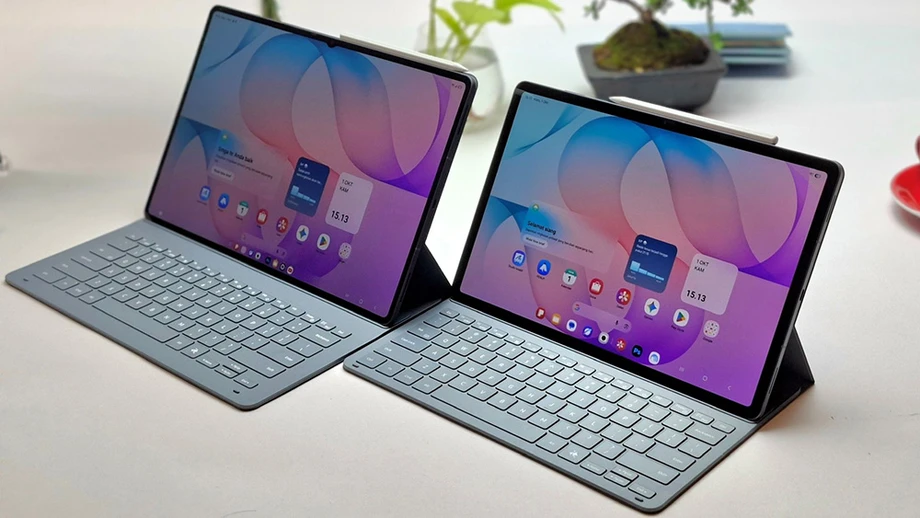
A 14.6 Inch Screen With a Laptop Ambition
Samsung put its largest Android tablet on sale in Indonesia on 7 October 2026, and the pitch is direct: a 14.6 inch Dynamic AMOLED 2X display, a MediaTek Dimensity 9500 processor, an S Pen and a keyboard cover in the box. The Galaxy Tab S12 Ultra costs Rp25,499,000 in its Wi-Fi version and Rp27,999,000 with 5G. The smaller Galaxy Tab S12+ starts at Rp21,999,000.
Contents
- A 14.6 Inch Screen With a Laptop Ambition
- What Rp25 Million Buys in Indonesia
- Thin Body, Bright Panel and a Flicker Warning
- Can DeX and a Keyboard Replace a Laptop?
- A Chip That Is Fast Until It Gets Hot
- What Galaxy AI Does on a Screen This Size
- Photoshop in the Box, and the Apps That Are Not There
- Battery, Charging and the Pen
- How Much Faster Than the Tab S11 Ultra?
- What the Same Tablet Costs Elsewhere
- Bluetooth Audio Leaves Some Codecs Out
- Why Samsung Bets on Indonesian Buyers
- Key Points
The question buyers keep asking is whether a slab 5.1 mm thick can take over from a laptop. Indonesian testing recorded an AnTuTu score of 3,537,611 points, which put the tablet above 81% of users in the benchmark database at the time of the run. Long graphics tests tell a harder story: across 20 loops of a stress test the score fell from 7,091 points to 3,089, a drop of 56.4%. Both figures describe the same machine, and the gap between them is what matters for anyone planning to use it as a main work device.
Independent labs reached similar conclusions from different angles. One measured peak HDR brightness of 1,747 nits on the panel, well above the 1,600 nits Samsung advertises, and then measured performance losses of 69% and 81% in sustained graphics runs. Reviews published in November 2026 in Europe, India and the United States largely agreed on the tablet's strengths, its screen and its build, and on its weakness, which is heat.
What Rp25 Million Buys in Indonesia
Samsung sells the series in four versions, each in Gray or Silver, with a microSD slot that accepts cards up to 2TB for photos, video and project files. Memory runs from 12GB with 256GB of storage to 16GB with 1TB on the Ultra. The S12+ tops out at 12GB with 512GB.
- Galaxy Tab S12 Ultra, Wi-Fi: Rp25,499,000
- Galaxy Tab S12 Ultra, 5G: Rp27,999,000
- Galaxy Tab S12+, Wi-Fi: Rp21,999,000
- Galaxy Tab S12+, 5G: Rp23,499,000
Between 7 and 31 October 2026, Samsung stacked launch offers worth a total of up to Rp17.5 million. The package includes a guaranteed trade-in value of up to Rp11.5 million for an older Galaxy Tab, cashback of up to Rp2.3 million, a Rp1.5 million discount through Samsung Reservation+, and instalments from about Rp680,000 a month. Every purchase also carries six months of Google AI Pro and four months of Adobe Photoshop, valued at up to Rp2.4 million. The Indonesian launch announcement sets out the dates and the offer terms.
One detail separates Indonesia from several other markets. Samsung's Indonesian package includes the Book Cover Keyboard Slim alongside the S Pen, according to the company's launch materials, which changes the value calculation considerably. In India the Pro Keyboard Book Cover is sold separately at Rs 24,999, and in the United States the Pro Keyboard costs $399. Buyers comparing prices across countries need to add those accessories back in before deciding which market is cheaper.
Thin Body, Bright Panel and a Flicker Warning
Samsung kept the shape of the previous generation almost unchanged. The aluminium frame measures 5.1 mm on the Ultra and 5.3 mm on the S12+, with IP68 protection against dust and water, a rating still rare among tablets. Samsung's own listing puts the Wi-Fi Ultra at 690 g; review units weighed 692 g, and the 5G version reaches 695 g. The S12+ weighs 550 g in Samsung's figures, with test units at 553 g.
The display is the strongest argument for the price. Resolution is 2,960 by 1,848 pixels with an adaptive refresh rate up to 120 Hz, and the 16:10 shape leaves less letterboxing than a 4:3 iPad when films play. Independent testing found average brightness above 900 nits and peaks of 1,747 nits with HDR content, and reviewers described colours as more vivid than those of Apple's iPad Pro M5.
A caution applies to anyone sensitive to screen flicker. One lab noted the panel uses 240 Hz pulse width modulation to dim the backlight, a method that can cause eye strain or headaches for some users at low brightness. Four speakers with 4 channel Spatial Audio handle sound, and testers found them loud and clear, though light on deep bass. The rear cameras, a 13 megapixel main sensor plus an 8 megapixel ultra-wide on the Ultra, handle document scans and little more, with visible weakness in low light.
Can DeX and a Keyboard Replace a Laptop?
Samsung DeX turns the tablet interface into something closer to a desktop, with resizable windows and up to four separate workspaces for different projects. Multi Window places three apps on screen at once, and an external monitor can extend the workspace over a cable or wirelessly. In Indonesian testing, a Word press kit, a browser window and a draft article sat side by side without the user closing an app to switch tasks.
Typing, email, slide decks, online meetings and browser work run well on the 14.6 inch panel. The gap appears with software. Ulysses, a writing app many journalists use, is not available on Android, nor is Affinity. Chrome extensions work only in part, and the tablet edition of Adobe Photoshop offers fewer tools than the desktop version. Mouse control feels less precise than on Windows or macOS, which slows detailed work such as spreadsheet editing.
The S Pen also has limits that buyers rarely notice before purchase. The stylus still works without Bluetooth, so it cannot act as a remote shutter or run air gestures the way earlier Galaxy Note pens did. The hardware matches a laptop in portability: no Windows laptop weighs as little as this tablet with its keyboard attached, and a full charge of work fits in a bag that a 14 inch notebook would strain.
A Chip That Is Fast Until It Gets Hot
The Dimensity 9500 is built on a 3 nanometre process, a measure of how tightly transistors are packed on the chip; smaller numbers usually mean more speed for less power. Paired with up to 16GB of memory, it produced strong peak scores.
- AnTuTu 12.0.3: 3,537,611 points, above 81% of users in the comparison database
- Geekbench 7: 2,754 single core, 9,286 multi core, 16,082 GPU
- 3DMark Steel Nomad Light: 2,950
- 3DMark Wild Life Extreme Stress Test: 7,091 high, 3,089 low, 43.6% stability
- Geekbench AI 1.8.0 on TensorFlow Lite: CPU 2,089, 2,422 and 3,623 across precision modes; GPU 1,485, 2,127 and 1,771; NNAPI 663, 639 and 1,381
Other benchmark runs give context. A current AnTuTu 11 total of 3,598,931 points and Geekbench 6 figures of 3,229 single core and 9,763 multi core point to the same class of performance, measured with different versions of the tools. The interesting result is the stress test. When the graphics chip runs flat out for a long stretch, the tablet cuts its own speed to control temperature, a behaviour called thermal throttling. Independent labs recorded stability of 30.8% in one stress run and 18.7% in a Steel Nomad Light stress test, with surface temperatures approaching 59 degrees Celsius.
Peak speed still shows up in features. With 3DMark Opacity Micromaps enabled, frame rate rose from 103.37 to 119.28 frames per second, a gain of 15.4%, because the technique makes ray tracing, the light simulation behind realistic reflections, cheaper to compute. The benefit depends on each game supporting it. Buyers who render video for hours or play demanding games should weigh the throttling findings; people writing, reading and drawing will rarely reach the thermal ceiling.
What Galaxy AI Does on a Screen This Size
Galaxy AI sits across the Note Assist, Writing Assist and Circle to Search features Samsung ships with One UI 9 on Android 17. Note Assist tidies handwritten and typed notes and produces summaries, Writing Assist polishes emails and reports, and Circle to Search looks up whatever the user circles on screen.
Gemini runs as an agent that can search across apps, draft plans and manage a calendar. Multi AI Agents lets a user run several assistants in separate windows, for example asking Gemini for ideas while Perplexity hunts for research papers in another pane. Drawing Assist converts a rough S Pen sketch into a finished illustration in a chosen style, which suits stickers, invitations and early design concepts.
Processing splits between the device and the cloud. Some features run on the chip, while the assistant services need an internet connection, so the experience depends on more than the processor. Samsung leaned on these tools in its marketing: 50% of Galaxy Tab use in its internal data goes to productivity apps, 30% to entertainment and 20% to creative work. Six months of Google AI Pro come with the purchase, and the keyboard carries a dedicated AI key that summons Gemini from between the alt and arrow keys.
Photoshop in the Box, and the Apps That Are Not There
Samsung calls the Galaxy Tab S12 Series the first Android tablet to ship with Adobe Photoshop pre-installed, with four months of free access to the mobile Photoshop plan and an interface built for the S Pen. Clip Studio Paint, LumaFusion, CapCut, Goodnotes, Notability and Notion round out the creative and note-taking options, and a regional partnership with Canva covers presentation and social media design.
The creative workflow holds up in practice. A canvas can be pinched and rotated with fingers while the pen handles fine detail, and video editors cut clips and build timelines directly on the tablet. The limits come from Android itself, where many apps remain enlarged phone versions rather than rebuilt tablet tools. Illustrators who depend on Affinity, or writers who depend on Ulysses, will not find them in the Play Store at all.
Battery, Charging and the Pen
An 11,600 mAh battery sits behind the 14.6 inch panel, and Samsung claims up to 23 hours of video playback for the Ultra and 21 hours for the S12+, which carries 10,600 mAh. Real use lands lower. Continuous web browsing over Wi-Fi at 150 nits ran for 11 hours 31 minutes, more than 30 minutes less than the previous model managed in the same test. A simulated working day of browser, email, messaging and document editing lasted more than seven hours with 17% left in the tank.
Charging runs at 45W through Super Fast Charging 2.0. Samsung quotes about 95 minutes for a full charge from a compatible adapter, and one lab measured 88 minutes. That speed sits mid-pack for a premium tablet with a battery this size. Under the AnTuTu benchmark the battery dropped about 4% and the reported temperature climbed from 28.8 to 30.9 degrees Celsius, a sign that short bursts of heavy load cost little.
How Much Faster Than the Tab S11 Ultra?
Samsung did not redesign the body. The Galaxy Tab S12 Ultra has identical dimensions to the Tab S11 Ultra and weighs three grams less, which makes the chip the main reason to upgrade. Benchmark comparisons show a 25% gain in AnTuTu totals, 3,598,931 against 2,873,296, and an 18% gain in Geekbench 6 single core results, 3,311 against 2,799. Multi core scores moved from 9,105 to 10,075.
Category scores follow the same direction: 97 against 90 for performance, 94 against 87 for gaming, 95 against 92 for display, 84 against 79 for connectivity and 90 against 86 overall. The newer tablet adds Bluetooth 6.0 where the older one had 5.4, and ships with Android 17 and One UI 9 rather than Android 16 and One UI 8.5. In the United States the starting price rose by $200 to $1,399, which is the part of the comparison owners of the previous model will notice most.
What the Same Tablet Costs Elsewhere
Prices vary widely by market. In the United States the Ultra starts at $1,399 for 12GB of memory and 256GB of storage, rises to $1,600 for 512GB and reaches $2,000 for 16GB with 1TB. German buyers pay from €1,539. In India the Ultra is priced at Rs 1,49,999 and the S12+ at Rs 1,29,999, with the Pro Keyboard Book Cover costing Rs 24,999 on top. Colombia lists the S12+ from 5,474,900 pesos and the Ultra from 6,474,900 pesos.
Bluetooth Audio Leaves Some Codecs Out
Wireless audio support is broad but not complete. The tablet handles SBC, AAC, Qualcomm's basic aptX and Sony's LDAC, the last of which carries audio at up to 990 kilobits per second and works well with high quality headphones from other brands. Samsung's own Seamless Codec also appears, and testing with Galaxy Buds3 Pro switched on SSC UHQ, which supports transmission up to 24 bit at 96 kHz, though the actual output quality was not separately measured.
Several codecs are missing. aptX HD, aptX Adaptive and aptX Lossless are absent, as is the low latency LHDC format, and so is LC3, the codec behind Bluetooth LE Audio. Without LC3, Auracast does not work, which rules out broadcasting one audio stream to several pairs of compatible earbuds or hearing aids in the same room. The Android version does not decide these features on its own; manufacturers choose which codecs to implement, and Samsung left several out.
Why Samsung Bets on Indonesian Buyers
Samsung's own research over three years shows Indonesian Galaxy Tab owners spending about half their time in productivity apps, a finding the company used to justify two large screen models. Yadi Prayitno, head of the MX business at Samsung Electronics Indonesia, framed the shift around how people use the devices and around the AI tools that drew the most use.
For Samsung, good innovation has to simplify the daily experience, not add complexity. That is the principle we bring through the Galaxy Tab S12 Series. By integrating AI into the tablet experience, we want to help users manage information, develop ideas and carry out various activities more practically in one device.
Widyantoko Utomo, MX product marketing manager at Samsung Electronics Indonesia, described the same idea in terms of the hardware bundle rather than the software alone.
The Galaxy Tab S12 Series gives that flexibility in one device, with Galaxy AI that helps simplify activities, performance that supports intensive needs, and the S Pen and large screen experience that give more room for productivity and creativity, in a slim design.
Samsung did not disclose sales targets, shipment forecasts or expected market share for the series, and no Indonesian sales figures have been published since launch. The company also resists calling the tablet a replacement for either a phone or a laptop, describing the three categories as complementary. The full comparison between the two models sits in Samsung's buying guide.
Key Points
- The Galaxy Tab S12 Ultra went on sale in Indonesia on 7 October 2026 at Rp25,499,000 for Wi-Fi and Rp27,999,000 for 5G, with the S12+ from Rp21,999,000.
- Launch offers running to 31 October 2026 reached up to Rp17.5 million in value, including trade-in cover of up to Rp11.5 million and six months of Google AI Pro.
- The 14.6 inch Dynamic AMOLED 2X panel measured 1,747 nits in HDR testing, above Samsung's 1,600 nit claim.
- Peak performance is strong, with an AnTuTu score of 3,537,611, but sustained graphics runs kept as little as 18.7% of peak speed as the tablet throttled and surface temperatures neared 59 degrees Celsius.
- Battery life reached 11 hours 31 minutes of web browsing and 45W charging fills the 11,600 mAh cell in about 88 to 95 minutes.
- Android still lacks apps such as Ulysses and Affinity, and the S Pen has no Bluetooth, which limits the laptop replacement case.
- The tablet is the first Android device to ship with Adobe Photoshop pre-installed, with four months of free access in Indonesia.