
An operating system update could be needed to reopen chats
WhatsApp is beginning to block access for some people using older versions of Android and iOS, displaying a screen that requires a phone software update before they can reach their chats. The restriction was reported as reaching some users on October 5, 2026, with further accounts published on October 6 and October 18.
Contents
- An operating system update could be needed to reopen chats
- What changes when the warning appears?
- Why the restriction can arrive without an app download
- The versions and dates users need to check
- Why encrypted messages still need a secure phone
- How to check for an official update
- When the phone can no longer be updated
- Key Points
The change can arrive through WhatsApp's servers without the user downloading a new version of the app. Someone whose WhatsApp worked previously could therefore encounter an update requirement even though they have made no changes to the application.
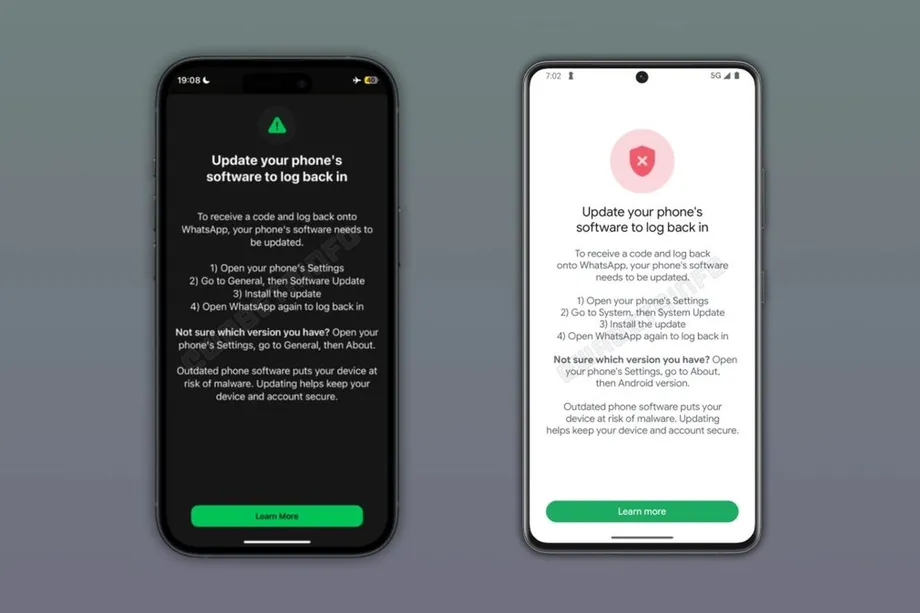
Affected users see a dedicated warning screen with a Learn More button. There is no option to skip the requirement and continue into the normal chat interface. Access is blocked until the operating system has been updated.
The reported minimum supported versions are Android 6.0 and iOS 15.1. An October 18 account also gives November 30, 2026, as the scheduled date for the iPhone minimum to rise to iOS 15.5. WhatsApp has not publicly specified which older versions trigger this particular login restriction, so the reported support minimums and the new blocking screen need to be considered separately.
For users, the immediate task is to check the software installed on their phone and whether an official update is available. A device that can still receive the required update may remain usable. A phone whose manufacturer has stopped providing compatible software may need to be replaced with a supported device.
What changes when the warning appears?
WhatsApp's warning interrupts access before the usual list of conversations appears. It directs users toward the phone's system settings, where operating system updates are installed, and provides information about checking the version already on the device.
The operating system is the main software that runs a phone. Android and iOS manage functions such as storage, permissions and the way applications use the device. Updating WhatsApp through an app store changes the messaging application; updating Android or iOS changes the software beneath it.
That difference matters when following the warning. A person may already have the newest WhatsApp version available to them and still need a system update. Downloading the messaging app again does not perform an Android or iOS upgrade.
The immediate effect is a loss of access on the affected phone. People who depend on WhatsApp for family conversations, work messages or group arrangements may be unable to reach those conversations while the requirement remains unresolved. Checking for an available update before a block appears can reduce the chance of an unexpected interruption.
Why the restriction can arrive without an app download
WhatsApp is reportedly applying the measure through its servers. In simple terms, the service can change an access rule centrally instead of waiting for every user to install a new app release.
Many familiar updates work differently: an app store offers a download, the user installs it, and new features or fixes become available. A rule controlled by the service can take effect when an existing installation next connects to it.
The rollout was described as reaching some Android and iOS users. People with older phones may therefore encounter the warning at different times. The practical check remains the same whenever it appears: inspect the installed operating system and use the phone's official update process.
The reported rollout also makes the age of the handset a less useful guide than its software status. The relevant questions are which operating system it runs and whether its manufacturer still supplies an update that meets the requirement.
The versions and dates users need to check
Android 6.0 or later and iOS 15.1 or later are the support minimums stated in the October accounts. The October 18 account attributes those requirements to WhatsApp's Help Center and describes a further change for iPhones at the end of November.
The reported schedule places the initial login warnings and the planned iPhone support change several weeks apart:
- October 5, 2026: Login warnings were reported as being applied to some Android and iOS users.
- October 6, 2026: Further reporting described a restriction delivered through WhatsApp's servers, requiring a system update before access could resume.
- October 18, 2026: An account listed Android 6.0 and iOS 15.1 as the current minimums and gave a later date for an iPhone requirement change.
- November 30, 2026: The reported minimum for iPhones is scheduled to rise to iOS 15.5.
For an iPhone running iOS 15.1, the stated November change would require moving to at least iOS 15.5. The useful comparison is the version installed on the phone against the version required by the service, followed by a check of what Apple makes available for that device.
Android owners face the same basic task, although update availability depends on the handset manufacturer and model. A phone can remain physically functional while the software available for it falls behind an application's requirements.
Why encrypted messages still need a secure phone
WhatsApp uses end-to-end encryption to protect messages as they travel between participants. This means the message is protected so that the intended devices can read its contents, rather than leaving the conversation readable while it passes through the service.
The phone itself still has to display and process those messages. If malicious software gains access to the device, it may be able to reach information where the user reads or writes it. Protecting the journey between phones and protecting each phone are different parts of keeping a conversation secure.
Older operating systems can contain known security weaknesses. Manufacturers release security updates to repair such weaknesses, but devices that stop receiving updates can remain exposed to methods attackers already understand.
The stated purpose of the new requirement is to reduce that exposure. Requiring newer system software adds protection beneath the messaging application, where the phone controls access to data and other device functions.
Other applications can also be affected by weaknesses in the operating system. For the owner of an older handset, the update check therefore has value beyond restoring WhatsApp: it helps establish whether the device is still receiving the security maintenance needed for everyday use.
How to check for an official update
iPhone users can check their installed version by opening Settings, choosing General and then About. To look for an update, they should return to General and open Software Update. This is the system update route described in the warning guidance.
Android users should look in their phone's Settings for the installed Android version and the system update menu. The names and locations of those settings vary between manufacturers, so the iPhone sequence should not be expected to match an Android handset.
The practical steps are straightforward:
- Read the warning and use Learn More for any additional information it provides.
- Check the operating system version in the phone's Settings.
- Look for an official system update offered for that device.
- Install the available update and then try opening WhatsApp again.
- If the required software is unavailable, check whether the device can still meet WhatsApp's support requirements.
Updates should come through the device's official settings. Users should avoid links in messages that claim to provide a special WhatsApp system update, as well as unofficial versions of WhatsApp. Installing a different messaging app package cannot replace the operating system update requested by the warning.
When the phone can no longer be updated
A manufacturer that has ended software support may offer no further update for an older model. In that situation, repeatedly checking the update menu will not produce a newer compatible version, and the user may need to move to a supported phone to continue using WhatsApp.
The difference is practical: an available update can resolve a software requirement without changing the handset, while a device with no suitable upgrade has a limit its owner cannot fix through WhatsApp's settings.
People relying on an older phone should check its update options before access becomes urgent. The reported November 30 iPhone change provides a specific date to prepare for, while the login warning makes the installed operating system an immediate concern for anyone already affected.
Key Points
- Some Android and iOS users are being shown a blocking screen requiring an operating system update before they can access WhatsApp.
- The restriction is reportedly delivered through WhatsApp's servers and can appear without a new app download.
- The reported support minimums are Android 6.0 and iOS 15.1; the precise versions targeted by the new block have not been announced.
- The iPhone minimum is reported to rise to iOS 15.5 on November 30, 2026.
- Users should check for updates through official phone settings. Devices without a suitable update may need to be replaced with a supported phone.