

A 30 day notice period ends with major apps still off limits
Doubao Phone Assistant announced on October 14 that it would gradually open screen automation access to third party applications after completing a 30 day public notice period for its Screen Automation Execution Protocol (SAEP). Developers can still refuse access after the notice period, and applications that have explicitly rejected automation will not be operated by the assistant.
Contents
- A 30 day notice period ends with major apps still off limits
- What changes after the notice period?
- How the rollout reached October 14
- Which applications have refused access?
- What SAEP actually controls
- An allowed action still needs authorization
- Restrictions must work beyond the assistant's promises
- Audit logs offer a record, with retention limits
- User choice and developer control remain in tension
- What users can expect next
- Key Points
The refusal list covers many of the services that would make a phone assistant useful for everyday tasks. Alibaba ecosystem applications include Taobao, Tmall, Cainiao, Alipay, DingTalk and Ele.me. Tencent ecosystem applications include WeChat, QQ, Honor of Kings and League of Legends: Wild Rift. Other listed services include Meituan, Pinduoduo, Kuaishou, Xiaohongshu, Zhihu, China Merchants Bank and Industrial and Commercial Bank of China.
The change is therefore an expansion of access, not unrestricted control of the phone. It replaces a temporary requirement for developers to actively accept automation with a mechanism that gradually opens eligible applications unless their developers have refused or configured restrictions. System security rules, user authorization and an application's own business checks still apply.
Doubao says developers may submit a refusal at any time and that the platform will respond within three working days. That response commitment is not the same as a published guarantee that every request will be implemented within that period. The announcement says relevant operations will be closed promptly, without giving a separate universal implementation deadline.
The practical question for users is which parts of a task the assistant can complete. An application may be entirely unavailable, a sensitive page may be blocked, or a final action may require the user to take over. SAEP provides mechanisms for all three outcomes.
What changes after the notice period?
During the public notice period, Doubao limited automation to system applications, ByteDance applications and third party services that had explicitly agreed to participate through SAEP or official email communication. Other applications were not operated by default.
After the notice period, applications that have neither submitted a refusal through official channels nor configured a disabling policy become candidates for gradual access. The September explanation of the plan described that opening as dependent on risk levels, rather than a simultaneous switch across every application.
This distinction matters when interpreting an unsuccessful task. Before October 14, an application could be inaccessible simply because its developer had not actively agreed to participate. After the change, access can still fail because of a refusal, a page restriction, an identity check, a user confirmation requirement or the application's own security controls.
The assistant's consumer version launched on September 14 with its phone operation capability in beta. Other functions, including Doubao intelligent services, shopping assistance, recording summaries and work tasks, are separate from whether a particular external application permits screen automation.
How the rollout reached October 14
The policy change follows earlier clashes between automated phone operation and application security systems. In December 2025, the first Doubao phone technology preview encountered WeChat login problems, Taobao verification challenges and banking applications that stopped login or payment activity after identifying a risky environment.
The subsequent consumer launch put a formal declaration process ahead of wider access. The main developments were:
- December 2025: The Nubia M153 introduced Doubao phone automation, followed by restrictions and security challenges in several major applications.
- September 14, 2026: The consumer assistant launched its phone operation beta, and the 30 day notice period began. Some M153 users reported losing previously available automated tasks.
- September 16: The Nubia NaviX Ultra reached the market with the consumer assistant. Reports describe this date as its launch or the start of sales.
- September 17: Doubao clarified that developers could still refuse automation after the notice period.
- October 14: Doubao announced that the notice period had ended and that eligible third party access would open gradually.
For existing users, the September restrictions could feel like a loss of functionality. Reports described M153 owners who could no longer use familiar automated ride booking, food ordering and other tasks. Those restrictions reflected the temporary permission rules, rather than proof that every affected developer had rejected the assistant.
Which applications have refused access?
The October 14 refusal list extends beyond Alibaba and Tencent. Reports also identify DeepSeek, WPS and Vipshop, alongside shopping, social media, banking and local service applications. China Mobile, China Unicom and China Telecom applications were also described as refusing access.
These restrictions affect the Nubia M153 and Nubia NaviX Ultra. Their importance is less about the raw number of applications than the services they cover. A shopping task may reach an unavailable marketplace, a communication task may stop at a messaging application, and a financial task may face both a developer refusal and separate system security requirements.
The published descriptions are not a complete count of every accessible and inaccessible application. An earlier report claimed that 90% of frequently used applications had progressively supported Doubao's GUI agent, but it did not identify the measurement method or the full group being counted. That figure cannot establish the share accessible under the October rules.
September descriptions of supported services named Cao Cao Mobility, Qishui Music and Feishu Minutes. A service appearing in a phone operation support list does not by itself establish that its developer completed every part of the SAEP technical integration. Support for a task and adoption of the protocol are related but distinct questions.
What SAEP actually controls
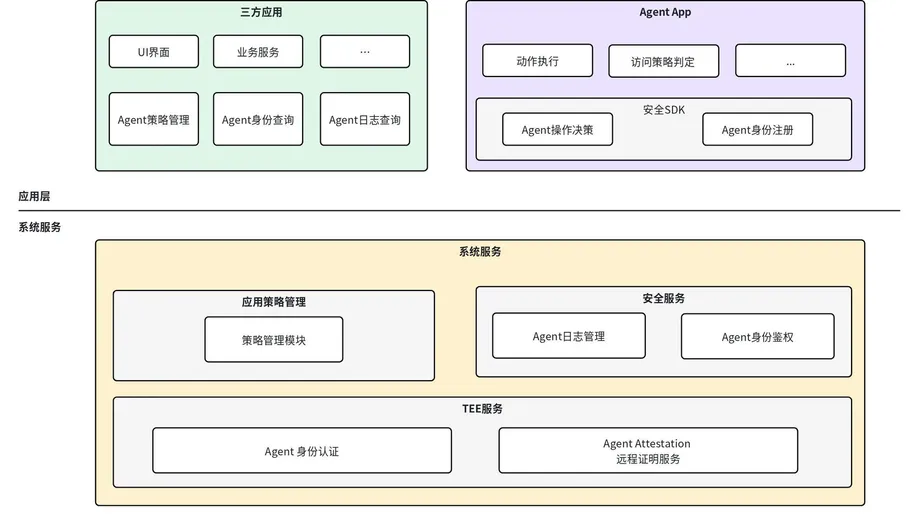
Doubao's official integration guide describes SAEP as a protocol through which Android applications declare boundaries for a GUI agent. A GUI agent understands a graphical user interface and performs actions such as clicking buttons or entering text, instead of relying solely on an application's dedicated software interface.
The guide identifies support for ObricUI version 2.2 and above. This is not a declaration that SAEP works on every Android phone. Developers must check whether the feature is present and enabled on the target device. If that check fails, their applications must continue relying on their own security controls.
Restrictions operate at three levels: App, covering the entire application; Activity, covering a particular Android screen or page; and Intent, covering a business action such as publishing or deleting content. Here, an intent means the purpose of an operation, not simply the visible button the assistant touches.
That structure lets an application permit some assistance while protecting sensitive steps. It can prohibit all agent activity through global_disable, prevent screenshots through screenshot_disable, or block simulated clicks and text entry through input_disable. Other controls address content modification, final publication, deletion and rewards or promotional benefits.
An allowed action still needs authorization
The official guide makes a central distinction between an application's permission and the system's final decision. The outcome depends on the agent's identity and trusted status, the system security baseline, the application's declared policy, and the user's authorization for the current task.
Applications cannot weaken the system baseline. If the system requires a block or user intervention, an application cannot turn that outcome into permission. When several applicable rules conflict, the stricter result takes effect. If policy parsing fails, the system falls back to the application's usable default policy and records the reason.
The guide describes three principal outcomes. ALLOW permits the relevant system capability, but does not remove application authentication or user authorization requirements. BLOCK stops the action and must not lead the assistant to seek another route around the restriction. CALL_USER pauses automation for a system confirmation or manual takeover.
A confirmation applies only to the specific step displayed to the user. It is not blanket permission for every later action. Payments, transfers, account authentication, publication, deletion and permission changes are among the sensitive activities for which the system may require confirmation, user takeover or refusal.
A fourth label, CLARIFY, appears in the documentation for clarification or softer constraints. Its precise meaning and availability depend on the target software package. The guide also warns developers against assuming that the order of App, Activity and Intent rules allows a later rule to override an earlier restriction.
Restrictions must work beyond the assistant's promises
SAEP's strongest technical claim is that restrictions should operate at system control points, rather than depend only on the agent choosing to obey. Screenshot access, accessibility reading, clicks and simulated input are supposed to pass through controlled execution paths.
The guide gives concrete examples. An application prohibition can prevent the target application from entering the agent's virtual display. A screenshot restriction can use a secure display layer. Input limits can stop simulated actions in Android's input management path.
There is an important qualification: complete enforcement of business intent restrictions depends on the target system version. Developers should not accept an agent's statement that it complied as sufficient evidence that a publication, deletion or reward restriction is technically enforced.
The recommended basic integration is a static policy packaged with the application. The system reads and caches it when the application is installed or updated, without requiring the application's process to be running. Optional dynamic updates allow rules to change with user status or business conditions. These updates must use increasing version numbers, and a failed update must preserve the previous valid policy.
Audit logs offer a record, with retention limits
The protocol provides interfaces for applications to inspect registered agents and query audit records relating to their own application. Identity information may include an agent's identifier, package name, signature, type, trusted status and version. Registration alone does not mean an agent is authorized for every business action.
The audit design records both the policy decision and the actual execution result. This allows developers to distinguish permission followed by failure from a rejected action followed by an attempted bypass. Records can associate an agent with a session, task step, target application, page, action type, policy version and reason code.
The guide calls for limited disclosure: audit records should not contain raw screenshots, sensitive personal information entered by users or complete interface control trees. Applications may query only records associated with their own package, not inspect other applications' histories.
Logs are stored in a secure area on the device and retained for 60 days by default. Rolling deletion also starts when the database exceeds 100 MB or the record count exceeds 100,000. These are alternative triggers, so a busy device may lose older records before 60 days. Actual query, export and retention capabilities depend on the system version.
Doubao has separately described a preference for processing sensitive information on the device. Its team says data that must reach the cloud receives additional encryption locally, with the relevant key destroyed after the session. Those are stated design practices, not an independent finding that every deployed workflow meets them.
User choice and developer control remain in tension
SAEP gives developers a structured way to refuse or limit automation, but that does not settle the legal debate over whether an assistant acting for a user needs separate permission from each application. The protocol's operating rules and the legal status of user authorization are different matters.
Ge Jiangqiu, an associate professor at Fudan University Law School, argues that an agent essentially assists or acts on behalf of the user, with the legal effects of its actions belonging to that user. Wu Peicheng, a researcher at Zhejiang University's Guanghua Law School, supports a single user authorization approach and argues that requiring additional platform permission would restrict daily use and increase industry costs.
Zhai Wei, executive director of the Competition Law Research Center at East China University of Political Science and Law, frames access between applications in terms of user control over personal data, including portability and deletion. Huang Yinxu, an associate professor at Renmin University of China Law School, similarly argues that valid system authorization should not require repeated permission from external platforms when an agent accurately executes a user's instructions.
These are scholarly positions, not a court ruling that removes developer restrictions. In practice, Doubao's announced approach respects explicit refusals. A user's instruction therefore does not override an application's prohibition within the assistant's operating rules.
What users can expect next
The NaviX Ultra's 12 GB memory and 512 GB storage version was priced at 5,999 yuan, with a starting price of 5,499 yuan after the national subsidy. That is a 500 yuan reduction, or about 8.3% of the listed price. Purchasing the device does not guarantee access to every application or completion of every task.
Doubao's demonstrations show the intended experience: an assistant using a camera view to find a cabinet within a specified size and budget, or using a known address to arrange a ride. Those demonstrations illustrate planned workflows, not evidence that every shopping or transport service permits them under the current rules.
No detailed schedule has been announced for individual applications to become accessible after October 14. The published descriptions also do not establish a definitive acceptance rate, a complete rollout timetable or uniform technical enforcement of every intent restriction across supported versions.
The next practical test is whether users receive predictable explanations when a task stops: a developer refusal, a protected page, a system safety rule or a request for personal confirmation. Gradual opening expands the assistant's possible reach, while SAEP determines where that reach must end.
Key Points
- Doubao announced gradual opening of third party screen automation on October 14 after a 30 day notice period.
- Applications that explicitly refuse access will not be operated by the assistant.
- The refusal list includes major Alibaba and Tencent services, banks, shopping platforms and other popular applications.
- Developers can still refuse access, with Doubao committing to respond within three working days.
- SAEP supports restrictions across entire applications, individual pages and specific business actions.
- System safety requirements and user authorization remain necessary even when an application permits automation.
- The official guide specifies ObricUI 2.2 and above, with some capabilities dependent on the target version.
- No detailed schedule for opening individual applications has been announced.