
Resolute Raccoon Changes the Foundations of Ubuntu
Canonical released Ubuntu 26.04 LTS, named Resolute Raccoon, on April 23, 2026, bringing Linux 7.0, a desktop built around Wayland and replacements written in Rust for some of the operating system's most widely used commands. Standard security support runs until April 2031, while subscription options can extend coverage to 2041.
Contents
- Resolute Raccoon Changes the Foundations of Ubuntu
- Why the Name and Artwork Matter
- Wayland Becomes the Only GNOME Session
- A New Set of Everyday Applications
- Rust Replaces Critical Command Utilities
- Encryption Moves Into a More Mature Phase
- GPU Computing Enters the Official Repositories
- Linux 7.0 and a Revised Package System
- Server Updates and Compatibility Changes
- Desktop Appearance, Accessibility and Flavours
- When to Upgrade and How Long Support Lasts
- The Bottom Line
The release makes Ubuntu's transition away from the X11 desktop session permanent for its main GNOME edition. It is the first Ubuntu release with long term support to make that change, completing a shift toward Wayland that began nearly a decade ago. Existing X11 applications can still run through XWayland, a compatibility layer, but users cannot select a full X11 desktop session.
Ubuntu, described as the world's most popular Linux distribution, is changing more than its interface. The release replaces traditional implementations of sudo and core command utilities with alternatives written in Rust, strengthens encryption options and brings AMD ROCm and NVIDIA CUDA packages into its official repositories.
Desktop and Server editions are available immediately for systems with 64-bit processors, with ARM64 images available for alternative architectures. The release targets both individual users and enterprises that need an operating system maintained for years.
Resolute Raccoon also carries a personal legacy. Its name was the last Ubuntu codename chosen by Steve Langasek, the veteran Debian and Ubuntu release manager who died in early 2025. His choice connects the release's focus on reliability with the determination he brought to open source development.
For existing users, the timing of an upgrade depends on their current version. Ubuntu 24.04 LTS users must wait for the normal direct upgrade route, while users of Ubuntu 25.10 should receive upgrade prompts within days of the release.
Why the Name and Artwork Matter
Steve Langasek, widely known by his IRC handle Vorlon, spent decades advocating for open source principles and guiding Ubuntu releases through complex development cycles. He selected Resolute to express determination and unwavering commitment, qualities associated with both the animal's survival instincts and the dependable operation expected from an LTS release.
Raccoons provided the biological inspiration through their adaptability, intelligence and ability to thrive in urban environments. Those traits also reflect the open source community's approach to solving problems.
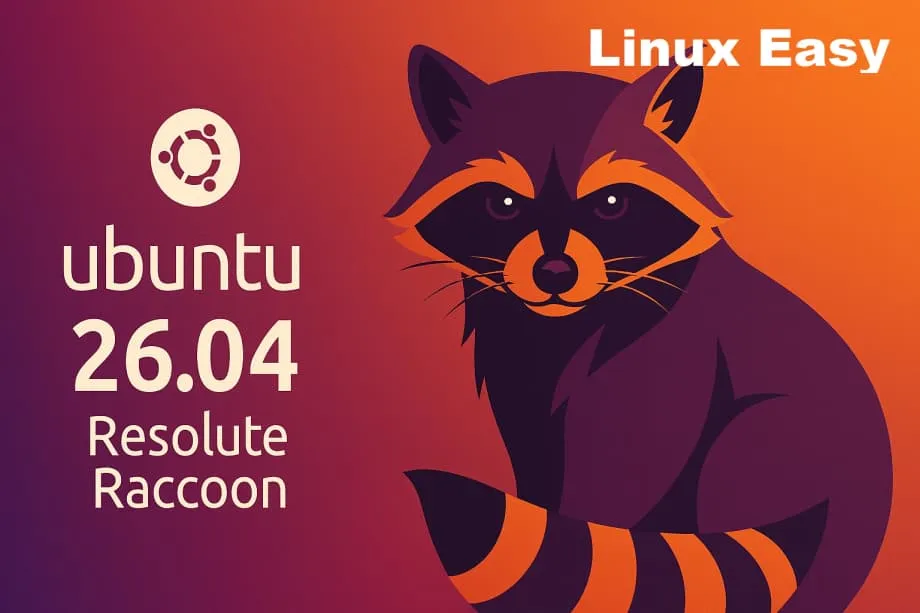
Canonical's design team, led by artist Marcus Haslam, built the mascot around a geometric, radial structure intended to express system logic and consistency. Bands on its tail create a repeated visual rhythm across the composition.
The design team's description connects the mascot with the release's emphasis on dependable operation:
Resolute Raccoon is a mascot designed around resilience and reliability, with a quiet confidence at its core. Resourceful and steady under pressure, it exemplifies a problem-solving mindset.
Community artwork expands the visual identity beyond the default wallpaper. Nearly 200 submissions contributed to the collection, with winning entries from mascot, digital abstract and photography categories providing backgrounds for users throughout the release's lifespan.
Winners include Simple Raccoon by cnusr25 in the mascot category, Ubuntu Coffee Mug by ezspain in digital abstract, and Winter Grand Triangle by mizuno-as in photography. Together, the official design and community contributions give users a broad selection of ways to personalise their desktops.
Wayland Becomes the Only GNOME Session
GNOME 50 provides the desktop foundation for Ubuntu 26.04 LTS. The removal of the X11 GNOME session follows delays in previous releases caused by bugs discovered late in development. Wayland now serves as the sole display protocol for the default desktop experience.
XWayland preserves access to applications that still use X11. The practical change is at the desktop session level: an older application can continue running, while the main Ubuntu edition no longer offers an entire desktop operating through X11.
Modern display features move out of experimental status. Variable refresh rate, or VRR, allows a compatible display to change its refresh timing to match the images being produced. Fractional scaling adjusts the size of interface elements in smaller steps, helping users choose a comfortable size on displays with different pixel densities. Both features become stable and activate automatically on compatible displays.
GNOME 50 also introduces session saving and restoration. After a reboot, it attempts to reopen applications and windows in their previous positions, reducing the work needed to reconstruct a desktop workspace.
Nautilus, the file manager, receives performance improvements of up to five times faster directory loading and ten times faster thumbnail generation. These changes affect familiar tasks such as opening folders and waiting for small image previews to appear.
A New Set of Everyday Applications
Showtime replaces Totem as the default video player. Its minimalist GTK4 interface hides controls during playback, keeping attention on the video rather than the surrounding buttons.
Resources replaces System Monitor for viewing hardware usage. Built with Rust, it presents information about system activity through a visual interface. Papers takes over from Evince as the document viewer, adding tools for ink annotations and support for digital signatures.
Loupe replaces Eye of GNOME for viewing images. It supports gestures using multiple touch points and provides basic editing capabilities, bringing viewing and simple adjustments into the same application.
Ptyxis becomes the default terminal emulator in place of GNOME Terminal. It uses GPU acceleration and includes a tab overview, profile switching, and container support for Podman and Toolbox. Containers provide separate environments for software, making that integration useful to users who work across different development setups.
Ptyxis also changes its header bar to red when sudo privileges are active. That visual warning tells users when commands have elevated permissions, meaning they can make changes that ordinary accounts cannot.
The application refresh sits alongside changes to the desktop's appearance and accessibility. Rather than changing only the background image, Ubuntu 26.04 revises tools used for watching videos, reading documents, viewing photographs, checking hardware activity and working at the command line.
Rust Replaces Critical Command Utilities
Ubuntu 26.04 moves several foundational components to Rust implementations, a process sometimes called oxidation. The sudo command now runs through sudo-rs, while commands including ls, cp, mv and cat use uutils in place of GNU coreutils.
These tools carry out basic but essential jobs. Sudo lets an authorised user run a command with elevated privileges. The other commands list files, copy them, move them and display their contents. Their frequent use makes compatibility and reliability central to the transition.
Rust's appeal here is memory safety. Its checks during compilation prevent classes of memory management errors that can lead to security vulnerabilities. The traditional sudo implementation was affected by CVE-2021-3156, a vulnerability disclosed in 2021 that had remained undetected for 10 years and allowed attackers to gain higher privileges through a memory management error.
Jon Seager, Canonical's Vice President of Engineering, has described resilience, rather than faster execution, as the attraction of replacing these components with Rust versions:
It's the enhanced resilience and safety that is more easily achieved with Rust ports that are most attractive to me.
For most users, the transition is intended to be invisible: familiar commands continue doing familiar jobs while their underlying implementations change. Compatibility remains a consideration for specialised uses, however. Uutils currently passes approximately 88 percent of GNU coreutils compatibility tests.
The original implementations of both sudo and the core utilities remain available in the repositories for cases requiring full compatibility. That gives administrators a fallback when a particular workflow depends on behaviour the Rust replacements do not yet reproduce.
Encryption Moves Into a More Mature Phase
TPM-backed full disk encryption moves from experimental status to a production feature. It binds encryption keys to particular hardware and Secure Boot states, connecting access to the disk with the machine and its expected startup configuration.
Users can configure this encryption during installation without having to enter a passphrase at every boot. The Security Center provides management of PINs after installation and options for encrypting the disk again.
Ubuntu 26.04 also enables post-quantum cryptography by default. This prepares encrypted connections for potential attacks from future quantum computers, which could threaten existing cryptographic methods.
OpenSSH uses the hybrid mlkem768x25519-sha256 algorithm, while OpenSSL applies X25519+ML-KEM to TLS connections. Hybrid encryption combines a classical method with a method designed to resist quantum attacks, maintaining compatibility with existing systems while adding protection against that future threat.
Snap Permissions Prompting requires explicit user approval when applications running in sandboxes seek access to cameras, microphones or file systems. A sandbox restricts an application's access to other parts of the computer; prompting gives the user a direct decision when additional access is requested.
Linux 7.0 adds Intel TDX support for virtual machines isolated through hardware. That supports confidential cloud computing, where workloads run with an additional boundary separating them from the surrounding environment.
The Security Center brings these security features into a unified interface, replacing separate configuration tools and reducing the amount users need to keep track of when securing their systems.
GPU Computing Enters the Official Repositories
AMD ROCm and NVIDIA CUDA packages are now available directly from Ubuntu's official repositories. Canonical is positioning the release as a platform for artificial intelligence and machine learning workloads, combining access to GPU computing tools with the stability of an LTS operating system.
Developers can install ROCm through standard apt commands instead of adding an external AMD repository and manually managing its signing keys. Bringing packages into the normal installation and update process simplifies both individual setup and automated deployments.
Canonical has established a dedicated engineering team to maintain these packages. Security patches arrive through standard update mechanisms, and Ubuntu Pro subscriptions provide support for ROCm and CUDA packages extending up to 15 years.
The repository additions address version conflicts and dependency issues that previously complicated configurations using multiple GPUs. A dependency is another software component that a package needs to function; consistent package availability helps deployment scripts obtain the expected components in server environments.
The combination places Ubuntu alongside specialised AI distributions while retaining enterprise support arrangements. For organisations, the practical attraction is a common operating system base for development tools, GPU workloads and long running infrastructure.
Linux 7.0 and a Revised Package System
Linux 7.0 improves hardware support for Intel Nova Lake and AMD Zen 6 processors and adds initial compatibility with Qualcomm Snapdragon X2. Its major version number follows Linus Torvalds' practice of resetting the counter when minor version numbers approach 20, rather than marking an architectural revolution.
The kernel also introduces Time Slice Extension. Applications can request a brief extension of execution time during critical operations, a mechanism intended to benefit audio processing and gaming workloads.
APT 3.2 adds transaction history and rollback capabilities. Each installation, upgrade and removal is logged with a unique identifier, making package changes easier to trace. The new apt why and apt why-not commands follow dependency chains to explain why a package is present or absent.
Ubuntu also divides linux-firmware into 18 packages organised by hardware vendor. This allows selective downloads instead of updates to a single package of roughly 600 megabytes, reducing the bandwidth required when only part of the firmware collection needs updating.
The Ubuntu App Center expands beyond Snap applications to manage Deb packages as well. Users can uninstall traditional packages directly through the graphical interface.
Software & Updates no longer ships by default. Canonical determined that its repository management features posed excessive risks for casual users. People who need to manage Personal Package Archives, or PPAs, must install the utility manually.
Server Updates and Compatibility Changes
Server installations receive PHP 8.5.2, PostgreSQL 18, MySQL 8.4 and OpenStack 2026.1. These updated infrastructure components accompany the broader changes to the kernel, security tools and package management.
The next generation Subiquity installer brings the convenience of a live session to server deployments. Automated partitioning and network configuration options streamline installation on physical machines and in virtual environments.
Several older features are being removed or changed. Support for cgroup v1 has ended, potentially breaking older container workloads. Administrators running those workloads need to include that change in their compatibility checks.
The linux-lowlatency package has been retired. Its replacement, lowlatency-kernel, applies tuning through GRUB at boot, changing how users obtain that configuration.
Google Drive integration no longer works within Nautilus. Users who depended on access through the file manager must use a browser instead.
Organisations planning production deployments have several changes to test together: Wayland as the only GNOME session, Rust implementations of command utilities, revised hardware recommendations and removed legacy functionality. Testing environments provide a place to check specialised workflows before migrating production systems.
Desktop Appearance, Accessibility and Flavours
The Yaru icon theme receives a visual update. Folder icons become shorter and squatter, with rounded edges and vivid use of accent colours. The Ubuntu Dock switches from transparency to an opaque background, improving contrast against different wallpapers.
New boot animations use the mascot's tail in a sunburst motif. Accessibility changes include relocated login screen menus, bold text in notifications and a reduce motion setting for users sensitive to animations.
The Wellbeing panel offers optional tracking of screen time and reminders to take breaks. Parental controls allow usage limits for managed accounts, adding controls for households and other settings where accounts need restrictions.
Canonical recommends 6 gigabytes of RAM for comfortable desktop operation, although Ubuntu can install on systems with less memory. Users with limited hardware may prefer Xubuntu or Lubuntu, which have lower resource requirements.
Ubuntu MATE and Ubuntu Unity have suspended their LTS releases for this cycle because of contributor shortages. They continue with regular releases every six months.
The remaining flavours retain LTS support. They include Kubuntu with KDE Plasma 6.6, Xubuntu with Xfce 4.20, Lubuntu with LXQt 2.3, Ubuntu Budgie with Budgie 10.10, Ubuntu Cinnamon with Cinnamon 6.4, Ubuntu Studio and Edubuntu.
When to Upgrade and How Long Support Lasts
Ubuntu 26.04 LTS receives standard security updates for five years, until April 2031. Extended Security Maintenance through Ubuntu Pro continues through 2036. Ubuntu Pro is available free for personal use on up to five machines.
Commercial Legacy add-ons can extend coverage through 2041, bringing the total available support period to 15 years. That longer period depends on the relevant subscription and add-on arrangements.
Direct upgrades from Ubuntu 24.04 LTS remain disabled until Ubuntu 26.04.1 arrives on August 6, 2026. Canonical follows this practice to allow initial fixes before enabling migrations between LTS releases. Users who require an immediate move must perform a clean installation.
Ubuntu 25.10 users should receive upgrade prompts within days of the April 23 release. The principal dates are:
- April 23, 2026: Ubuntu 26.04 LTS was released, with Desktop and Server downloads available.
- August 6, 2026: Ubuntu 26.04.1 is scheduled to arrive, opening the normal direct upgrade route from Ubuntu 24.04 LTS.
- April 2031: Standard security support ends.
- 2036: Extended Security Maintenance through Ubuntu Pro reaches its stated endpoint.
- 2041: Commercial Legacy add-ons can extend total support to this year.
As of April 25, the central choice for existing LTS users is whether to install afresh now or wait for the point release and its initial fixes. Enterprises also need to decide which support period fits their deployments and verify that applications, containers and desktop workflows work with the new foundations.
The Bottom Line
- Ubuntu 26.04 LTS Resolute Raccoon was released on April 23, 2026, with Linux 7.0 and GNOME 50.
- The main GNOME desktop uses Wayland only, while XWayland keeps X11 applications working.
- Sudo-rs and uutils replace traditional command implementations with Rust alternatives; original versions remain available.
- TPM-backed disk encryption becomes a production feature, and post-quantum cryptography is enabled by default.
- AMD ROCm and NVIDIA CUDA packages enter Ubuntu's official repositories.
- Showtime, Resources, Papers, Loupe and Ptyxis replace familiar default applications.
- Ubuntu MATE and Ubuntu Unity do not receive LTS status this cycle because of contributor shortages.
- Standard support runs until April 2031, with paid options extending coverage to 2041.
- Direct upgrades from Ubuntu 24.04 LTS wait for Ubuntu 26.04.1 on August 6, 2026.