What Anthropic began rolling out on November 24
Anthropic started pushing out a beta feature called "Install as app" on Tuesday, November 24, that turns a Claude artifact into a program with its own icon and its own window on a Mac or a Windows PC. It is available on every Claude plan, from Free through Pro, Max, Ultra, Team and Enterprise, and it requires Claude for Mac or Windows version 6.28899.0 or later. Nothing has to be packaged, signed or given an API key.
Contents
- What Anthropic began rolling out on November 24
- Under the hood, a web page wearing a native coat
- Three levels of permission, and the top one is different
- The warning Anthropic wrote into its own help page
- An approval covers one version, a denial sticks
- Where the feature stops working
- Two decisions for IT, and a gap in the audit trail
- The apps Anthropic's own staff built
- Why the App Store question is now on the table
- The rest of Anthropic's developer week
- What is not yet settled
- Key Points
Artifacts are the interactive pieces Claude builds beside a chat: dashboards, charts, calculators, trackers, small tools and web pages. Until now they lived inside the Claude app, so getting back to one meant opening the chatbot, signing in and scrolling to the conversation where it was made. An installed app opens from the Dock, from Spotlight, from the Start menu or from a desktop shortcut instead. Anthropic engineer Felix Rieseberg said the apps can use operating system interfaces and that no coding skills are required.
The installation itself takes a few clicks. A user opens an artifact in the Claude desktop app and picks "Install as app" from the Share menu, from the artifact's title menu or from a right click menu. On a Mac the program lands in a folder called Claude Apps inside the user's own Applications folder, at ~/Applications/Claude Apps, which is why Spotlight finds it and why it can be pinned to the Dock. On Windows it appears in the Start menu or as a desktop shortcut.
Anthropic framed the change as a matter of habit rather than novelty. "If you rely on a tool for work, it should open like the rest of your apps and remind you when something needs your attention," the company said in its announcement.
The company's own description of the feature is compact. "When an artifact is installed as a Mac or Windows app, it gets its own icon and opens in its own window instead of inside Claude," it said. "You can share it with others, and it needs your permission before it can interact with your computer. You choose how much to allow."
Under the hood, a web page wearing a native coat
These are not native Mac or Windows programs. Federico Viticci, founder and editor in chief of MacStories, took the feature apart and found that an installed app is an HTML page wrapped in an Electron shim that is entirely run by the Claude app's own Chromium process. To open, the apps need the main Claude desktop app installed, signed in and connected to the internet.
The detail is concrete. A disk analyzer he built, called Storage Lens, shipped as a bundle of about 900 KB containing no web code at all: a 51 KB Objective-C launcher linked only against Cocoa and Foundation, which uses Electron's app shim mechanism to find /Applications/Claude.app and load Claude's copy of the Electron framework, an 80 KB notification helper built on the UserNotifications framework that will not run unless a signed Claude.app launched it, and an icon. What looks like a standalone app with its own Dock icon is a Claude process in disguise.
The app's interface was a single HTML file written without React, Tailwind or D3, with a capacity ring drawn in SVG using stroke-dasharray tricks, a hand-written treemap layout, and an icon painted on a canvas element each time the app launched. The frosted "Liquid Glass" look came from CSS: backdrop-filter, light-dark() and color-mix(in oklab), plus an SVG distortion filter whose map is generated pixel by pixel to bend the background like a lens. He built and refined it inside ordinary Claude conversations using Anthropic's Opus 5.5 model, not Claude Code.
Viticci compared the approach to Raycast's Glaze product, which renders Vite and React web apps inside Apple's WKWebView wrapped in a custom Swift shell. The Electron route keeps everything inside Claude's own runtime, which is why the apps update themselves whenever the artifact behind them changes and why every request they make is billed against the same account.
Three levels of permission, and the top one is different
Each installed app starts at the Default level, where it can do only what the same artifact could do in a browser tab. From there it can ask for App permissions: sending notifications, adding a macOS menu bar item or a Windows system tray icon, listening for keyboard shortcuts while the user works in other programs, and floating above other windows. An app allowed to float can also read where the mouse cursor is on the screens.
The highest level is called Full access to this computer. An app holding it can run programs and read, change or delete files without asking each time. Anthropic does not review an app before it is installed, so that level is fenced off. A user can grant it only to apps they built themselves or, on Team and Enterprise plans, to apps built by people in their organization. On Free, Pro, Max and Ultra plans every other person counts as outside the organization, so an app shared by a friend generally cannot request full access at all.
Taking a permission back is done differently on each system. On a Mac, click the app's name in the menu bar; on Windows, right click the title bar. Both lead to a Permissions option. Switching off full access stops the programs the app started, but it does not undo changes the app has already made to files.
The apps can also reach Claude's connectors, the links to outside services such as Gmail, Slack, Notion and Salesforce, so an installed tool can pull from a work account without touching a local file. Building an app and every request it sends to Claude count toward the user's plan usage limits, which means a heavily used app can eat into a monthly allowance.
The warning Anthropic wrote into its own help page
Anthropic's support document states the risk without softening it. The page tells users to weigh trust before handing over the keys to a machine.
Only allow it if you trust everyone who wrote the app. Anthropic doesn't review apps before you install them.
Apple made a related argument earlier in November, when it changed Mac settings to give users more control over the data they share with apps, particularly over anything resembling full access to a computer.
Before granting an app such extraordinary access, users should understand that it puts all the data on their Mac at risk. These changes are designed to help them do that and empower them to make informed decisions about their own data and privacy.
The comparison matters because the new apps sit in an unusual place: they look like ordinary software, they can request powers that ordinary software needs a signed installer to obtain, and the approval flow lives inside Claude rather than in the operating system's own security prompts. Viticci noted that when he installed a demo app made by someone else, a Full Disk Access prompt appeared inside Claude and was already satisfied because Claude itself had been granted that access earlier.
An approval covers one version, a denial sticks
Permissions behave differently depending on the answer given. An "Allow" applies to a single version of an app, so Claude asks again after any update, including edits the user makes themselves. A "Don't allow" stays in place until the user changes it.
There is one gap in that loop. Code that an app loads from another website can change without triggering a new permission request, so an app whose visible version never changes can still behave differently over time.
Sharing creates a second kind of expiry. If the owner of a shared app stops sharing it, the programs that app started stop too, within about 20 minutes. That window can stretch longer while Claude has no way to check, such as when it is offline, signed out or working under another organization. A workflow built on someone else's app therefore has an owner who can switch it off, although the artifact behind it can usually be copied by prompting for a new version.
Where the feature stops working
The list of exclusions is long enough to matter for planning. Install as app is not available on Linux, on the web or on mobile. Organizations with HIPAA-ready setups do not get it, and neither do hybrid Claude deployments. Artifacts built from templates such as Claude Docs, Slides and Sheets cannot be installed, and neither can legacy artifacts or live artifacts from Claude Cowork.
Team plans start with installation and app permissions switched on and full computer access switched off. Enterprise plans keep all three off until an owner turns the feature on. Administrators have two places to set limits, Claude organization settings and device management policy, and the stricter of the two applies. Device policy is the route to use when a restriction also has to cover personal Claude accounts on company computers.
The dependence on a live connection drew criticism. Marko Zivkovic argued that requiring a user to be online and signed in to Claude to open an app undercuts the point of desktop software, and concluded there is little reason to use the feature over existing third party programs or Apple's own tools. Apple's Xcode 27 has added support for agentic coding, which lets an assistant write and revise native code inside the company's own development environment.
Two decisions for IT, and a gap in the audit trail
For technology teams, the release splits into two separate questions: whether employees may install these apps at all, and what an app may do once installed. The answers do not have to match. An organization can allow installation while keeping full computer access switched off, and a sensible pilot keeps production accounts and sensitive files out of the first test.
Logging is the part that needs attention. Anthropic says its Compliance API records app opens and access checks as artifact views, but not installations, permission decisions, or the actions an app takes on the computer. A policy that requires a record of who approved access, or of what a program did locally, will not find that in Claude's log.
Anthropic's own guidance for a trial run is modest: start with something like a meeting checklist built from sample notes, test one permission, have one colleague allow notifications while another declines, then edit the artifact and have both reopen it to see how the approval resets. Giving the app a named owner who can retire it matters as much as the technical settings.
The apps Anthropic's own staff built
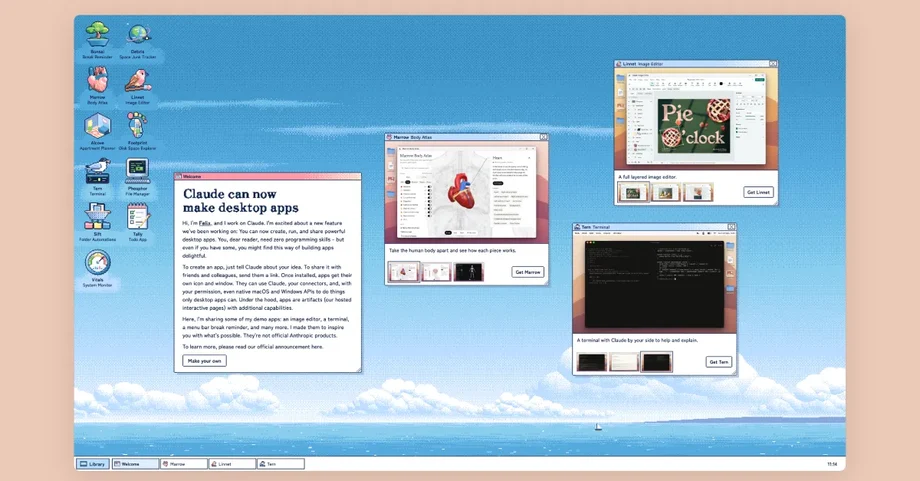
Anthropic's internal experiments show the range it expects. Staff have used the feature to build an image editor called Linnet, a file manager with a cinematic look called Phosphor, a terminal that talks to Claude called Tern, a folder organiser and a performance monitor. The company has published example apps for users to try. Rieseberg said he has used it for terminals, file managers, video editors, communication tools and "little desktop pets."
These apps can do native things, like adding menu bar items, creating transparent windows, or sending notifications.
Outside the company, the early examples are more modest. Aaron Mok described dashboards for tracking sales, outreach trackers for marketing, deadline calendars, a reminder to leave the desk for a walk and a tool that logs progress toward a weekly reading goal. Artifacts had already been used for an order tracker or a meeting dashboard that pulls from a calendar and an inbox, and installing them as apps removes the step of going back into a chat to find them.
Why the App Store question is now on the table
Viticci put the competitive point sharply: a system that lets anyone describe a tool and get an icon in the Dock bypasses the App Store and Apple's notarization process for software distributed outside it.
If I were Apple, I'd be very concerned that Anthropic is now shipping a nicely packaged system for users to make whatever app they want and turn Apple's ecosystem into Claude's ecosystem of tools and mods on their computers.
Jonny Evans made a related argument about the app economy, writing that as models get better at inventing narrow tools on request, the value of small single purpose apps shifts, and the store sales and digital tax revenue built on them move with it. He also framed the release as AI companies pushing out of the cloud and into the platform itself.
Anthropic is not alone in that push. Google now lets Gemini operate apps on the Mac, and in early November Postman added itself to Claude Code and Codex without asking. The difference here is distribution: the artifact ecosystem now produces software that runs outside a browser tab, on a desktop, without a store review, an installer signature or a developer account.
The rest of Anthropic's developer week
The desktop feature did not arrive alone. On the same day, Anthropic let MCP servers ship skills and run tasks inside Claude, extending the connector system that these apps already draw on. It also published its Siren test, which checks whether Claude can escape deliberately weakened sandboxes, a detail worth weighing against a feature that can hand an app full access to a machine.
A week earlier, Anthropic added zero data retention to its Enterprise Frontier Safeguards. That setting does not apply to these installed apps, according to the help page, so an organization that relies on it for other Claude work is not covered here. The company's usage policy also now explicitly prohibits using Claude to develop software and components that enable weapons to function, a change reported by AFP.
What is not yet settled
Anthropic has given no date for when the beta ends and whether general availability will change the permission model. Linux support is not announced. Whether apps installed by colleagues will remain usable when an administrator later tightens device policy is not spelled out beyond the rule that the stricter policy applies.
What is already decided is the shape of the trade. A tool a person depends on can now open with a double click, keep itself up to date with the artifact behind it, and ask for as much of the computer as its author is trusted with. The same design means the tool stops working when the connection drops, when the account signs out, or roughly 20 minutes after whoever shared it stops sharing. The next test is the one Anthropic's own guidance sets out: whether a second version of an app can be used safely by someone other than the person who built it.
Key Points
- Anthropic began rolling out "Install as app" in beta on November 24, 2026, for Claude for Mac and Windows, version 6.28899.0 or later.
- The feature is available on Free, Pro, Max, Ultra, Team and Enterprise plans, with no coding, packaging, signing or API key required.
- Installed apps run as HTML inside an Electron shim managed by Claude's Chromium process, and need the Claude app, an internet connection and a signed-in account to open.
- Permissions come in three levels: Default browser level, App permissions for notifications, shortcuts, menu bar items and floating windows, and Full access to this computer.
- Full access can be granted only to apps the user built, or on Team and Enterprise to apps built by colleagues; Anthropic does not review apps before installation.
- Each approval covers one version, so Claude asks again after every update, while a denial stays in place until the user changes it.
- Anthropic's Compliance API records app opens as artifact views but not installations, permission decisions or local actions taken by an app.
- Linux, the web, mobile, HIPAA-ready organizations and hybrid deployments are excluded, as are artifacts made from Claude Docs, Slides and Sheets templates.
- Every request an app sends to Claude counts toward the user's plan usage limits.
- Anthropic staff have built an image editor, a file manager, a terminal, a folder organiser and a performance monitor with the feature.